HubSpot CRM Migration: The Part That Is Never on the Project Plan
A HubSpot CRM migration has two tracks. The technical one finishes in weeks and is usually fine. The behavioral one takes months, is almost never planned, and is where migrations fail. Here is how to run both.
A HubSpot CRM migration is the project of moving a team's data, process, and daily work from a previous CRM into HubSpot, and it succeeds only when both the technical transfer and the behavioral adoption are designed and measured as separate tracks.
A project plan for a HubSpot CRM migration looks, on paper, like a data project. Export the old records, map the fields, import clean data, rebuild the workflows, train the team, go live. Six to twelve weeks, a project manager, a checklist of deliverables, a launch day. The checklist gets done. The data lands. And then, with some regularity, the team goes back to working roughly as it did before, inside a shinier system, with the same habits and the same gaps the old system had.
A HubSpot CRM migration is the project of moving a team’s data, process, and daily work from a previous CRM into HubSpot, and it succeeds only when both the technical transfer and the behavioral adoption are designed and measured as separate tracks. The technical track is the one on the project plan. The behavioral track is the one that decides the outcome.
What are the two tracks of a HubSpot CRM migration?
In a hubspot migration process, the technical track covers everything on the standard project plan. The behavioral track covers everything that determines whether the investment pays off:
- Technical track. Data export and cleanup, field mapping to HubSpot’s schema, record import, workflow and sequence rebuilds, integration configuration, user permissions, reporting setup, and validation that nothing dropped.
- Behavioral track. Process redesign for the new system (what steps does the team run inside HubSpot, and where?), rep onboarding to the new motion, adoption measurement from day one, and the reinforcement that keeps reps from reverting when quota pressure arrives.
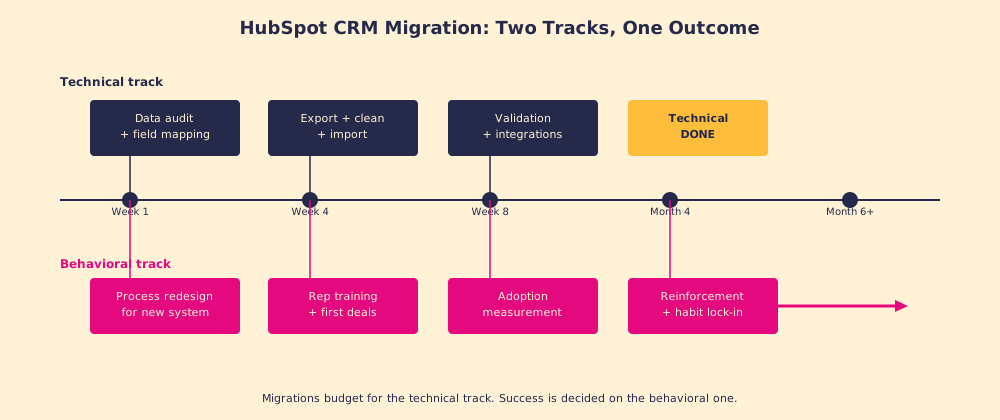
Most CRM migration budgets are 80% technical and 20% behavioral, which is roughly the inverse of where the failures live. Gartner puts the CRM failure rate at around 50%, and Forrester’s research puts it at 47%, with the leading causes being lack of process change (45%) and inadequate adoption support, not defective data imports (Forrester, CRM strategy research, 2024).
What are the four failure modes of a HubSpot CRM migration?
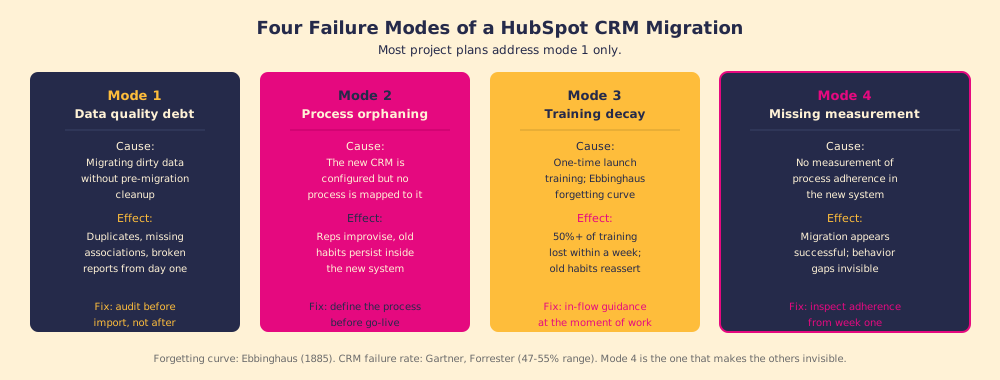
Gartner and Forrester name the category (lack of process, lack of adoption support), but the mechanism is specific. Four distinct failure modes account for most migration disappointments, and they operate in sequence: each one you miss makes the next harder to catch.
Data quality debt. The most visible failure mode and the one most teams address. Dirty source data, duplicate records, missing company associations, outdated contacts, gets migrated intact and becomes HubSpot’s problem. Reports break on day one because the input data never matched reality. The fix is a pre-migration audit: deduplication, record validation, and a decision on what not to migrate before a single record moves. The CRM migration to HubSpot is a forcing function to clean what should have been cleaned months ago.
Process orphaning. The more dangerous failure because it is invisible. Teams that migrate CRM to HubSpot with a solid hubspot crm setup but no defined process are the most frequent victims of this mode. The portal is configured correctly, the pipelines look right, the properties are set up. But no one defined what steps the team runs inside HubSpot, in what order, and what triggers each one. Reps open a well-built system with no process mapped to it and improvise. Improvisation means old habits inside new software: the same skipped fields, the same eyeballed stages, the same manual spreadsheet running parallel to the CRM. The fix is designing the process before go-live, not after.
Training decay. The failure mode with the best-documented mechanism. Hermann Ebbinghaus measured in 1885 that people forget more than 50% of what they learned within a day without reinforcement, and retention continues to drop for weeks (Ebbinghaus, Memory, 1885). A launch-day CRM training session, however thorough, runs directly into this curve. By week two, under normal deal pressure, the training has decayed and the familiar old way reasserts. The fix is not better training; it is in-flow guidance that surfaces the next right step in the moment of work rather than relying on memory.
Missing measurement. The failure mode that makes the others invisible. If no one checks whether reps are following the process in HubSpot, the migration appears successful: the data is there, the dashboards look populated, the system is “live.” The gaps only surface at forecast time, when the data proves unreliable, or at pipeline review, when managers realize the stages do not reflect reality. The fix is measuring process adherence from week one, deal by deal, field by field.
How do you run the behavioral track correctly?
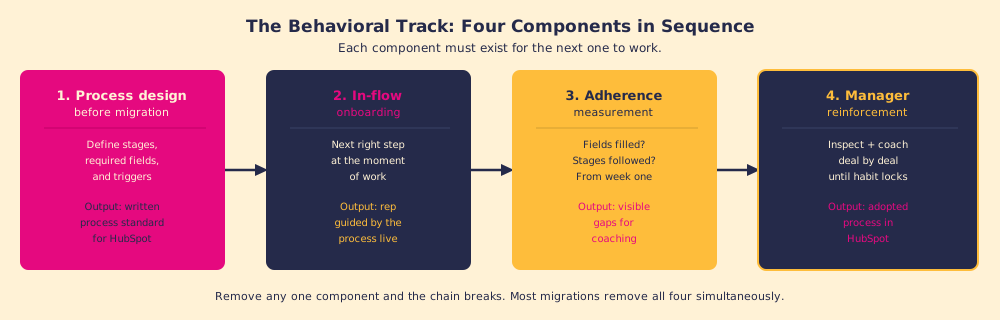
The behavioral track is not a training program with a launch date. It is an ongoing system with four components, each corresponding to one of the failure modes:
- Pre-migration process design. Before data moves, define the stages reps will run, the fields that must be filled at each stage, and the triggers that advance a deal. The process is the blueprint; the CRM migration fills in the floor plan. Migrating before the blueprint exists means reps do whatever they want in a newly configured space.
- In-flow onboarding. Launch-day training is useful orientation. The job is not to make reps remember the process; it is to surface the next right step in the moment they are working a deal. This is the principle Supered calls the Behavior Layer: continuous, in-the-moment guidance that meets the rep at the moment of work, in HubSpot, without requiring them to go somewhere else to get it.
- Adherence measurement from week one. Track which required fields are being filled, which stages are being followed, and which deals are drifting. Knowing that 30% of deals lack a discovery call logged in HubSpot by stage two tells you exactly where the behavioral track needs reinforcement. Without this data, the manager is coaching from instinct at best and ignorance at worst.
- Manager-led reinforcement. Data without coaching does not produce change. The measurement tells you where to look; the manager’s conversation with the rep is what closes the gap. Inspect and coach. The inspect step surfaces what is missing; the coach step explains why it matters and builds the rep’s judgment for the next deal.
What should you do before a HubSpot CRM migration?
The question most migration plans do not ask: what does the team need to stop doing in the old system before the new one goes live? Migrating behavior patterns from a broken process into HubSpot just gives you the same broken process in a better UI.
Three pre-migration decisions that the technical plan usually skips:
- Define what adherence looks like. What does a well-run deal look like in HubSpot? Which fields must be filled at which stage? What sequence of actions does a rep take from first contact to close? Write this down before the migration, not after, because you cannot measure adherence against a standard you have not defined.
- Decide what not to migrate. Not all data improves by moving. Contacts who have not engaged in three years, duplicate company records, deals closed without data, all of this is noise. A migration is a cleaning opportunity, and the decision to leave things behind is often the most valuable one made in the project.
- Choose the measurement system. How will you know, in week two, whether the process is being followed? What reports will you run? Who reviews them and how often? If the answer is “we will figure that out after go-live,” the measurement system will not exist on day one, which is exactly when you need it.
What we recommend
Run the technical and behavioral tracks in parallel from day one of the project, with equal planning. Hire for (or design for) the behavioral track as deliberately as you hire for the data work. The technical migration is necessary and finite. The behavioral migration is the one that pays back the project cost, and it does not close itself.
For the adoption work that follows any migration, CRM adoption is the right next read. For teams who want the full technical methodology, HubSpot migration walks the iceberg model in detail. And for teams who want to understand how the process layer works once the data is live, HubSpot implementation covers what the behavioral track looks like when it is built right.
Frequently asked questions
What is a HubSpot CRM migration?+
How long does a HubSpot CRM migration take?+
What are the most common HubSpot CRM migration mistakes?+
How do you migrate from Salesforce to HubSpot?+
Your process, running itself.