The Client Onboarding Checklist, Phase by Phase
The full client onboarding checklist, pre-kickoff through the 30/60/90 review, with a named owner on every line.
Plus the half no checklist can do: getting the team to run it the same way on account thirty.
A client onboarding checklist is the phase-by-phase list of steps a services team runs to bring a new client live, from pre-kickoff through the 30/60/90 review, with a named owner on every line.
A new client signs, and the project manager does what project managers do: copies last quarter’s onboarding plan, renames the folder, and starts assigning dates. The instinct is sound. A client onboarding checklist is the phase-by-phase list of steps a services team runs to bring a new client live, from pre-kickoff through the 30/60/90 review, with a named owner on every line. The full checklist is below, built to be lifted and used this week.
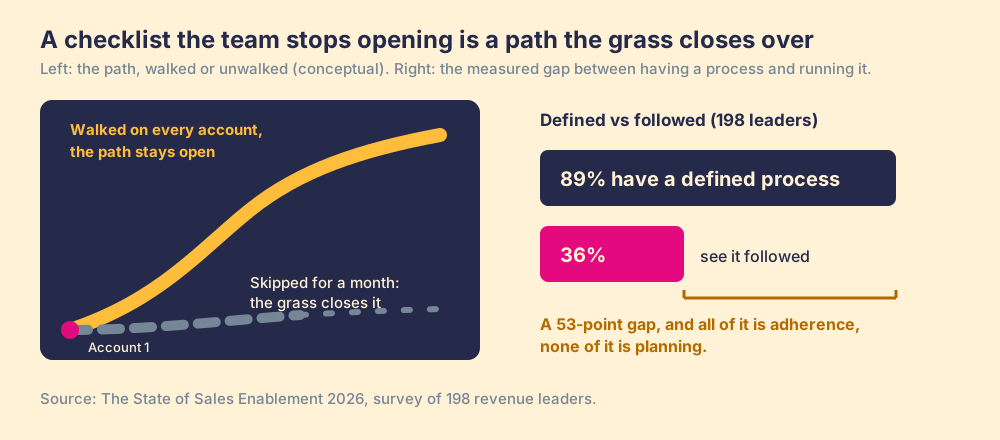
Carry one number in with you, though. In The State of Sales Enablement, our survey of 198 revenue leaders, 89 percent had a defined process and 36 percent saw their teams follow it. The checklist below gets you into the 89 percent by lunch. The 53 points between those two numbers are the half no document can give you, and the half that decides the renewal.
What goes in a client onboarding checklist?
Eight phases, in order, each line one action with one named owner: AM (account manager), PM (project manager), Delivery (delivery lead), or Client. Whether you call it a new client onboarding checklist or a customer onboarding checklist, the motion is the same: a services team bringing a whole account live, which is a different job from touring one user through a product. We map the full arc, including where checklists sit inside it, in our client onboarding guide.
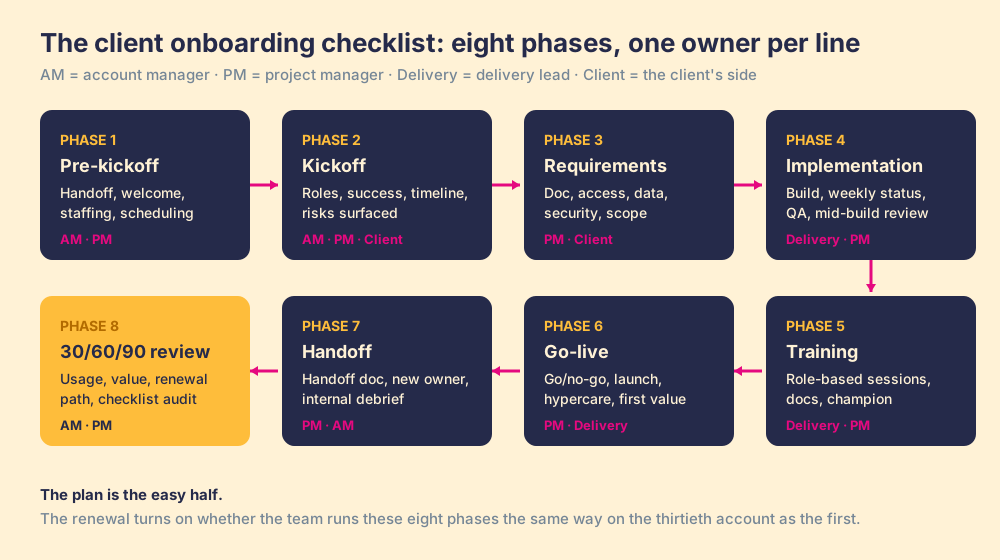
Phase 1: pre-kickoff
- Deal handoff. The AM reads the closed deal end to end: scope, price, promises made, and the names of the client stakeholders.
- Welcome email. The AM sends it within one business day: who the client will meet, what happens next, what we need from them first.
- Staffing. The PM assigns the delivery lead and blocks internal prep time before anyone talks to the client.
- Kickoff on the calendar. The PM books it inside the first week, agenda attached to the invite.
- Workspace provisioned. Delivery creates the project space, the shared folder, and the internal channel for the account.
Phase 2: kickoff
- Roles and points of contact. The AM opens by naming who owns what on both sides, one point of contact each way.
- Success definition. The PM asks the client to describe, in their own words, what live and working looks like, and records it verbatim.
- Timeline walkthrough. The PM presents the phases and dates; the Client confirms or amends them on the call.
- Risks and constraints. The PM asks for blackout dates, approval chains, and the decision-makers who are not in the room.
- Same-day recap. The AM sends the recap before end of day, each action item with an owner and a date.
Phase 3: requirements and access
- Requirements working session. The PM runs it live, and every open question leaves the session with an owner and a date.
- System access. The Client grants logins, admin seats, and API keys; Delivery confirms each one works before the line gets checked.
- Data handover. The Client delivers the files and exports; Delivery checks format and completeness the day they arrive.
- Security and legal clearance. The AM confirms the DPA, security review, and procurement steps are closed.
- Scope reconciliation. The PM checks the requirements against what was sold and flags any gap to the AM before the build starts.
Phase 4: implementation
- The build. Delivery configures against the requirements doc and logs any deviation with a reason.
- Weekly status. The PM sends progress against plan, open blockers, and what we need from the Client this week.
- Blocker escalation. The PM raises any client-side blocker within 48 hours of spotting it, while it is still a conversation.
- Internal QA. Delivery tests against the client’s success definition from kickoff, before the Client sees anything.
- Mid-build review. The PM demos work in progress so the Client can correct course while corrections are cheap.
Phase 5: training
- Role-based sessions. The PM schedules admins and end users separately; one generic session serves neither audience.
- Training in their instance. Delivery trains inside the client’s own account, on the client’s own data.
- Documentation handover. Delivery leaves guides where the client’s team will look while doing the work.
- Champion named. The AM confirms the client-side owner who carries the rollout forward internally.
- Pre-launch adoption check. The PM verifies users have logged in and done real work before go-live gets scheduled.
Phase 6: go-live
- Go/no-go review. The PM and the Client walk the launch criteria together; the date holds or moves on evidence.
- Launch. Delivery takes the account live and watches it through the first day.
- Hypercare window. Delivery holds a fast-response support lane for the first two weeks.
- First value confirmed. The AM verifies the client has hit the success definition from kickoff, at least once.
Phase 7: handoff to steady-state
- Handoff document. The PM writes the account summary: configuration, decisions made, open items, known quirks.
- Steady-state introduction. The AM introduces the long-term owner on a live call, never by email alone.
- Support paths. The AM shows the Client where to get help and how fast a response should arrive.
- Internal debrief. The PM runs a 30-minute retro: which checklist steps this account skipped, and why.
Phase 8: the 30/60/90 review
- Day 30: usage. The AM reviews adoption against the kickoff success definition and names the blockers.
- Day 60: value. The AM shows results against what the client said live and working meant.
- Day 90: the path forward. The AM sets the ongoing cadence and opens the expansion and renewal conversation.
- Checklist audit. The PM records which steps drifted on this account, so the next one starts smarter.
If you want this packaged as a copy-paste document with the owner columns pre-built, we keep one in our client onboarding template.
Why does a checklist work in an operating room?
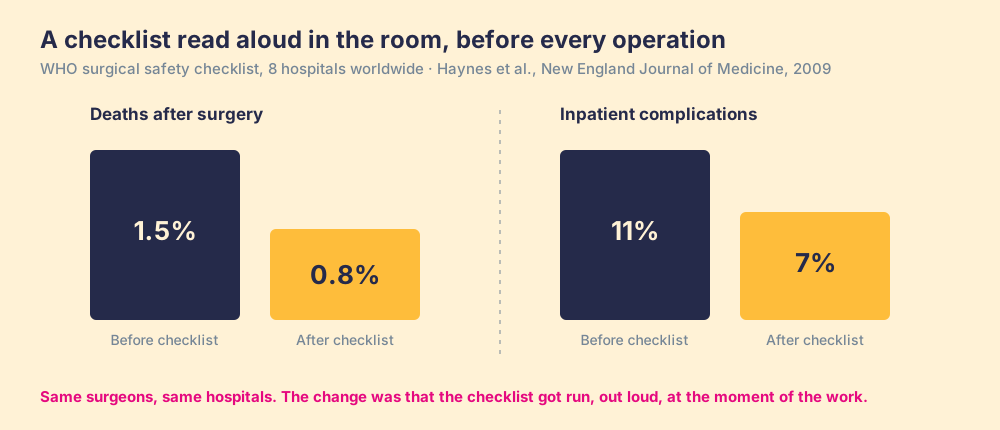
The strongest evidence for what a list of obvious steps can do comes from a field with higher stakes than agency work. In 2009, a team including Atul Gawande published the results of the WHO surgical safety checklist trial in the New England Journal of Medicine: across 8 hospitals worldwide, deaths after surgery fell from 1.5 percent to 0.8 percent, and inpatient complications fell from 11 percent to 7 percent (Haynes et al., NEJM 2009). The list itself held 19 items, most of which any surgical team would call routine.
Look at how that checklist was run, because the design carries the lesson. It was never a laminated card in a drawer at the nurses’ station. Someone read it aloud, in the operating room, at three fixed moments: before anesthesia, before incision, before the patient left. The list met the team at the moment of the work, and saying each line out loud was a named person’s job. Same surgeons, same hospitals, same routine items. What changed was where and when the list showed up, and whether anyone could skip it unnoticed.
Why does the checklist decay between accounts?
Your team will run the checklist above with care on the next account, because it is new and someone announced it. The trouble arrives around account ten. Hermann Ebbinghaus measured the mechanism in the 1880s: without reinforcement, people lose most of what they learn within days, the slope we now call the forgetting curve. Train the team on the onboarding standard once, at an all-hands or in a kickoff deck, and the standard starts fading before the week is out. By the tenth account, the steps live in three people’s heads in three versions. By the thirtieth, the checklist is a document the PM half-remembers writing.
A checklist the team stops opening mid-work behaves like a footpath through a field. Walked on every account, it stays bare and obvious, and the newest hire can follow it without asking anyone. Left for a month, the grass closes over it, and the team goes back to improvising a route that roughly resembles the old one. Our field data measures the ground this costs: of the 198 leaders in the State of Sales Enablement, 89 percent had a defined process and 36 percent saw it followed. The 53-point gap is grown-over path.
What does a checked box measure?
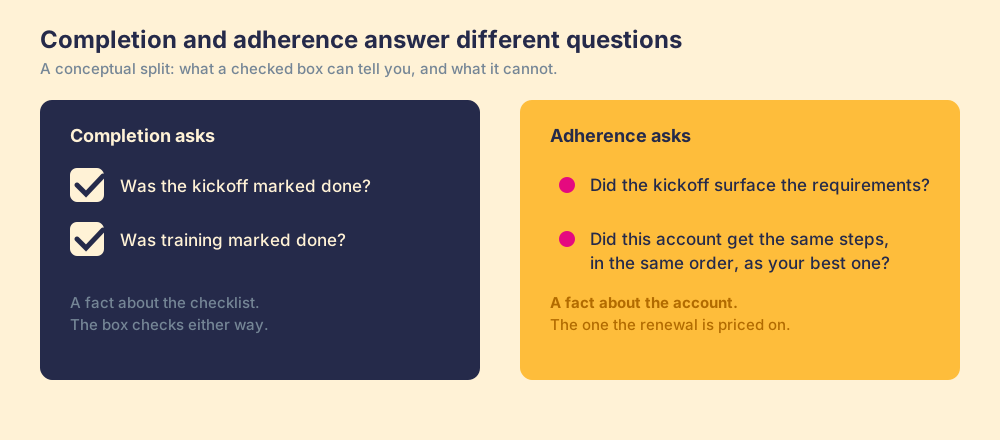
Checked boxes carry a failure mode of their own, separate from forgetting. A box records that a step was marked done; it stays silent on whether the step did its job. The kickoff can be marked complete while the requirements never surfaced, because the client’s ops lead missed the call and the PM did not chase. Training can be marked complete when four of twelve users attended. On the project board, both of those accounts look identical to the one where the steps ran properly.
Completion is a fact about the checklist. Adherence, whether this account got the same steps, in the same order and to the same standard as your best onboarding, is a fact about the account. The renewal gets priced on the second one, and a board full of green checkmarks cannot tell you which kind of green you are looking at.
A quick recap
- The checklist itself. Eight phases, pre-kickoff through the 30/60/90 review, each line one action with one named owner: AM, PM, delivery, or client.
- The evidence for checklists. The WHO surgical checklist cut deaths from 1.5 to 0.8 percent and complications from 11 to 7 percent across 8 hospitals, because it was read aloud at the moment of the work with a named owner (Haynes et al., NEJM 2009).
- The decay mechanism. Ebbinghaus’s forgetting curve: a standard trained once fades within days, which is how 89 percent of teams end up with a defined process while 36 percent see it followed.
- The measurement trap. Checked boxes measure completion. Adherence, whether this account got the same run as your best one, is the number the renewal follows.
What we recommend
Start with the plan, because you need it and it is cheap. Lift the checklist above, or the client onboarding template version of it, put owners on every line, and run it in whatever tool your team already lives in. If you have no documented onboarding today, that single move puts real structure under your next account, and structure is the floor.
Then treat the run as the actual purchase. The economics justify the effort: Frederick Reichheld’s research at Bain found that a five-point improvement in customer retention lifts profit anywhere from 25 to 95 percent (Reichheld, Harvard Business Review), and onboarding is where retention gets won. The surgical trial and the forgetting curve point at the same two moves: deliver the next step at the moment of the work, and inspect adherence per account instead of counting boxes. A project board alone does neither, which is the gap we walk through in client onboarding software. That behavioral half is what Supered is built for, as the Business Logic Layer over the tools you already run. If the plan exists and the run is the part that keeps slipping, book a demo and bring your checklist with you.
Frequently asked questions
What should a client onboarding checklist include?+
Who should own each step of client onboarding?+
How long does client onboarding take?+
What is the difference between a client onboarding checklist and a client onboarding template?+
How do you get a team to follow the onboarding checklist on every account?+
Your process, running itself.