SOP Examples: Five Formats, One Part They All Skip
SOP examples appear simple to copy. The hard part is the piece most templates do not include: the inspection hook that decides whether the procedure is ever followed. Here are five formats and what each one is actually for.
SOP examples are working instances of a standard operating procedure document, and they come in five main formats: step-by-step procedures, hierarchical procedures, flowcharts and decision trees, checklists, and video or screen recordings, each suited to a different kind of task.
A recipe card and a binder are both paper. Only one of them gets used while the food is actually cooking.
The same distinction separates SOP examples that become part of daily work from the ones that sit in a shared drive folder, last opened on the day they were uploaded. The format of an SOP matters less than where it lives and whether it has a mechanism that checks it was followed. Most examples, even good ones, stop at the recipe card and skip the question of where the card is when someone actually needs it.
SOP examples are working instances of a standard operating procedure document, and they come in five main formats: step-by-step procedures, hierarchical procedures, flowcharts and decision trees, checklists, and video or screen recordings, each suited to a different kind of task. Knowing which format to reach for is the first skill. The second is knowing what to add to any of them that most templates omit.
What are the five main SOP formats?
Each format is a different tool. Using the wrong one is like using a map when you need a checklist: technically a document, wrong for the situation.
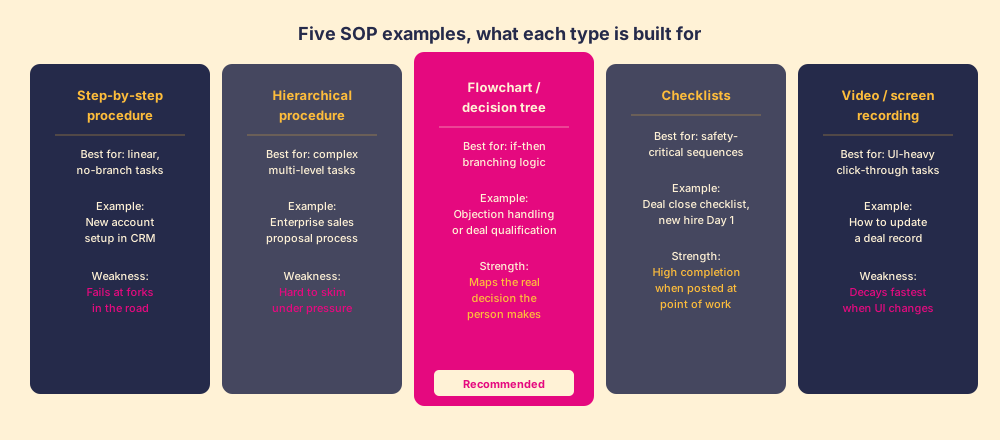
Step-by-step procedure. The default format: a numbered list of sequential actions. Step 1, Step 2, Step 3. It is the right choice when the task is linear and has no decision points, when the same steps happen every time in the same order with no branches. New account setup in a CRM, expense report submission, data export from a reporting tool. The limitation is exactly that: the moment the task has a fork (“if the prospect has a HubSpot contract already, do X; otherwise do Y”), the numbered list fails, because step 3 cannot be two different things at once.
Hierarchical procedure. A step-by-step procedure with sub-steps: 1, 1.1, 1.2, 2, 2.1, and so on. Useful for complex processes with multiple phases, where the phases need to stay visible while the individual actions are detailed. An enterprise sales proposal process, a product launch plan, a regulatory compliance review. The weakness is that a hierarchical procedure is hard to use under time pressure: scanning a seven-level outline to find the one step that applies right now is not faster than not having the SOP at all.
Flowchart or decision tree. A visual diagram that maps the if-then logic of a process. The diamond shapes are the decisions; the rectangles are the actions. This is the right format for any task that involves a judgment call: objection handling, deal qualification, incident triage, pricing approvals. A flowchart matches how a person actually thinks during the work, not how they would explain it after the fact. You make a decision, then an action, then another decision, not a linear march. The limitation is that a complex flowchart becomes unreadable; keep them to one page and one decision path.
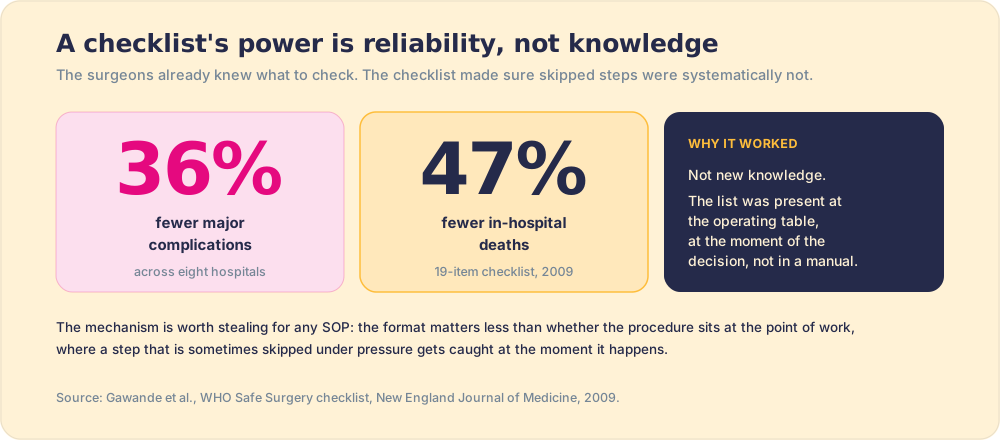
Checklists. Not procedures, but completion trackers: a list of required items that must be done before the task is considered complete. The surgical checklist research by Atul Gawande and the WHO Safe Surgery team (published in The New England Journal of Medicine, 2009) tested a 19-item checklist at eight hospitals across high- and low-income countries and found it reduced major complications by 36% and in-hospital deaths by 47%. The mechanism was not new knowledge; surgeons knew what to check. The mechanism was reliability: the checklist ensured items that were sometimes skipped under pressure were systematically not (Gawande et al., NEJM, 2009). That mechanism is worth stealing. A deal-close checklist, a new hire Day 1 schedule, a renewal risk review: all are better as checklists than as prose procedures, because the check-box format signals a binary that prose does not.
Video or screen recordings. A screen-capture walkthrough of a UI-heavy task. Right for: how to update a field in the CRM, how to run a report in a specific tool, how to format a proposal in the company template. The advantage is that “click the blue button in the top right” is far less ambiguous when you can see the screen. The disadvantage is decay rate: UI changes faster than documentation. A 90-second Loom from 18 months ago describing a button that no longer exists is worse than no SOP, because it trains people to distrust all the others.
What makes a real SOP example effective?
The format question is the easy part. The harder question is what goes inside any format to make it followed, because most SOP examples leave out the same elements:
- A clear trigger. The SOP must state the specific event that starts it, not a vague “when applicable.” An SDR marks a meeting as booked. A deal reaches Stage 3. A severity-1 ticket is opened. Without a trigger, the SOP is a procedure with no moment of application.
- One action per step. “Update CRM and send follow-up email” is two steps. Split them. A person who skips one cannot be coached unless the SOP is specific enough to surface the skip.
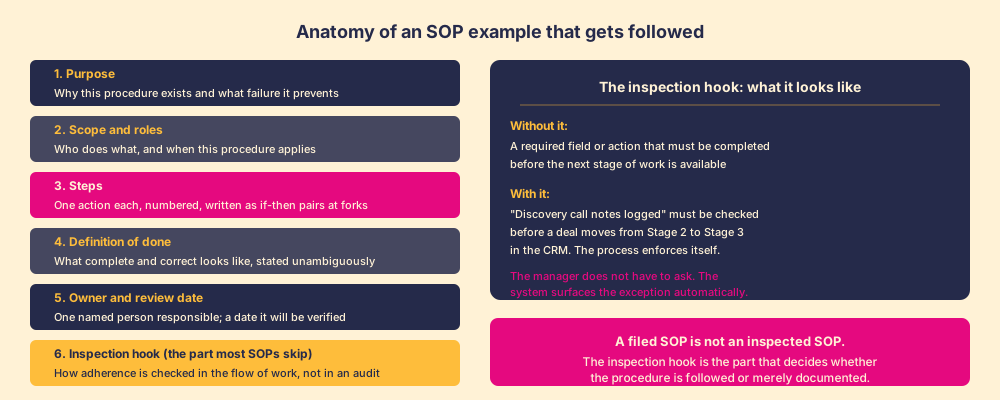
- A definition of done. What complete and correct looks like, stated so that two different people would agree. Not “call notes logged.” The specific fields, within a specific time window, with a binary outcome.
- An inspection hook. The mechanism that checks adherence in the flow of work, before the audit. More on this below, because it is the part most standard operating procedure examples omit.
The deeper question is what goes inside any format to make it followed long-term.
A definition of done. Step 7 on a discovery call SOP might say “log call notes in the CRM.” That is ambiguous. Does it mean any notes? Notes with specific fields filled in? Notes within 24 hours, or before the next meeting? A definition of done states what “complete and correct” looks like, unambiguously, so the person doing the work and the manager inspecting it are looking at the same thing. Without it, the SOP is a list of activities, not a standard.
An inspection hook. This is the part most SOP examples skip, and it is the part that decides whether the procedure is followed or merely documented. An inspection hook is the mechanism that checks adherence in the flow of work, built into the process rather than added as a separate audit. A discovery call SOP that requires a specific field to be populated before a deal can advance to the next CRM stage enforces itself: the software catches the skip at the moment it happens. A discovery call SOP filed in a shared drive folder requires the rep to remember it exists, find it, consult it, follow it, and log the output without any prompt. The first design relies on the system. The second relies on memory and discipline under quota pressure, which is an unreliable material.
B.J. Fogg’s research on behavior design, formalized in Tiny Habits (2019), identified three elements that determine whether a behavior occurs: motivation, ability, and a prompt (Fogg, Tiny Habits, 2019). A filed SOP improves ability (knowing what to do) but provides no prompt at the moment of the action. An inspection hook built into the workflow is the prompt. The closer the prompt sits to the action, the more reliably the action occurs. This is why Gawande’s checklist worked: the surgeon could not close the patient without the team running through the list, because the list was present at the operating table, not in an office.
For a deeper look at the structure of an SOP that gets followed, including the six parts and how they fit together, the post on how to write an SOP goes step by step.
Why do most SOP examples fail in the real world?
The failure mode is almost always location and timing, not quality. A well-written procedure filed in a shared drive requires a rep to remember to consult it, navigate to it, and read it before acting, all while the work is in front of them demanding attention. That sequence rarely happens. The procedure might as well not exist.
This is the finding Pfeffer and Sutton documented in The Knowing-Doing Gap (2000): organizations routinely build knowledge assets (playbooks, SOPs, training materials) and then discover that knowing the right thing to do does not reliably produce doing it (Pfeffer & Sutton, The Knowing-Doing Gap, Stanford University Press, 2000). The book surveyed dozens of companies and found the gap was not a knowledge problem; most people knew what they should be doing. It was a context problem: the conditions at the moment of work did not surface the knowledge when it was needed.
The implication for SOP design is practical: an SOP that is not accessible at the moment it is needed is not a functional SOP. An SOP for an objection handling sequence has to be available during the objection, not in a training folder the rep bookmarked three months ago. An SOP for CRM data hygiene has to surface when the rep is in the CRM, not when they happen to attend the monthly ops review.
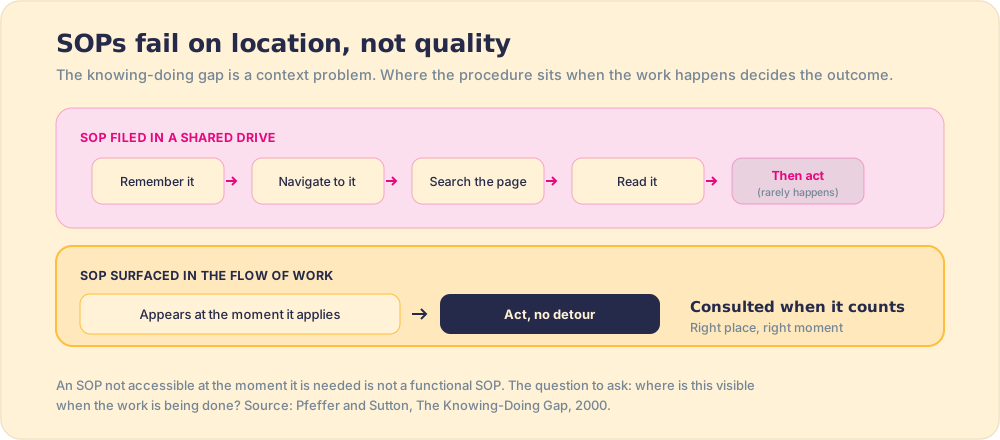
The design question to ask of any SOP example: where is this visible when the work is being done? If the answer is “in a folder” or “on a wiki page they have to search for,” the procedure has a location problem that the format cannot fix.
For the process documentation side of this, the process documentation pillar covers when and how to document, and the post on workflow documentation shows how to capture the handoffs that most SOPs miss.
What a practical SOP example looks like, by job type
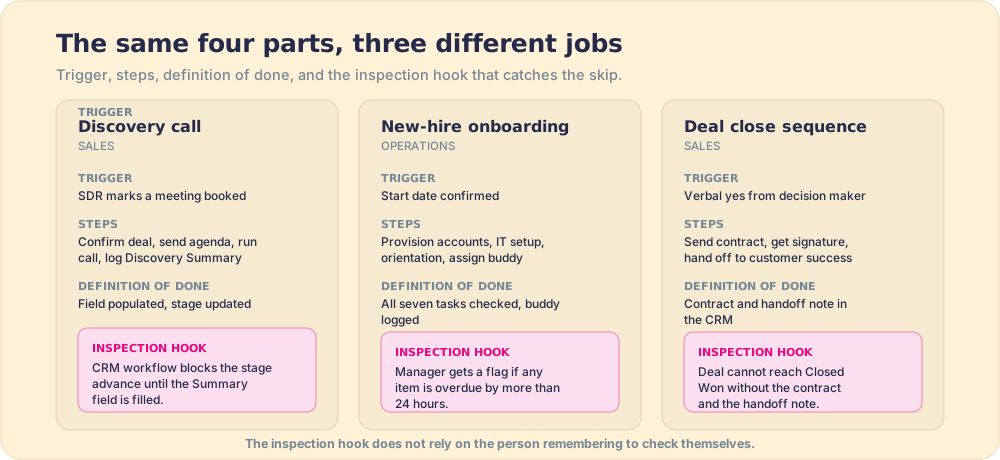
To make this concrete, here are three abbreviated examples with the inspection hook included.
Discovery call SOP (sales). Trigger: an SDR marks a meeting as booked. Steps: confirm contact, company, and deal size in CRM; send pre-call agenda; run the call using the question sequence; log notes in the “Discovery Summary” field within two hours; advance deal to “Qualified” stage if at least four of five qualification criteria are met. Definition of done: “Discovery Summary” field populated, deal stage updated or stage advance declined with a reason. Inspection hook: a CRM workflow prevents stage advance without the “Discovery Summary” field.
New employee onboarding SOP (operations). Trigger: new hire start date confirmed. Steps: provision accounts on Day -1; send welcome email with first-week schedule on Day -1; complete IT setup by 9 AM Day 1; run culture orientation session by noon Day 1; assign 30-60-90 buddy and document in the HR system. Definition of done: all seven provisioning tasks checked, buddy assignment logged. Inspection hook: HR system checklist auto-assigned to the onboarding coordinator with a deadline; manager receives a status flag if any item is overdue by more than 24 hours.
Deal close sequence SOP (sales). Trigger: verbal yes from the decision maker. Steps: confirm legal signatory, send contract via e-signature tool, schedule kick-off meeting before contract signing, get signed contract, log in CRM, hand off to customer success with deal context note. Definition of done: contract in the CRM, kick-off meeting scheduled, customer success handoff note completed. Inspection hook: deal cannot move to “Closed Won” without the contract attachment and the handoff note field.
Notice what each example has in common: a clear trigger, short steps, an unambiguous definition of done, and an inspection hook that does not rely on the person remembering to check themselves.
What we recommend
Pick the format that matches the task type: step-by-step for linear tasks, flowcharts for decisions, checklists for safety-critical sequences. Write each SOP short enough to read in under two minutes under pressure. Add a definition of done that leaves no ambiguity about what complete looks like.
Then add the inspection hook. That is the step most SOP examples omit, and it is the one that converts a documentation effort into a behavioral standard. The hook does not have to be software: a pre-meeting checklist physically posted on a phone, a required field in a form, a stage gate in a CRM, all work. The requirement is that the system catches the skip in the moment it happens, rather than surfacing it in a retroactive audit that arrives too late to change anything.
A well-formatted SOP that lives in a folder will not be followed reliably. A moderately formatted SOP posted where the work happens, with a mechanism that checks it was completed, will be. The recipe card is necessary. The placement of the recipe card on the counter while the cooking is happening is the part that makes it useful.
From here: the full six-part structure in how to write an SOP, the reusable blank format and SOP template examples in SOP template, and the documentation strategy it fits into in process documentation.
Frequently asked questions
What are some examples of standard operating procedures?+
What is the best format for writing an SOP?+
How long should an SOP be?+
What makes an SOP actually get followed?+
Your process, running itself.