The Salesforce Outlook Integration in 2026: Setup, the 2027 Retirement, and What Logging Misses
The Salesforce Outlook integration is three products with confusing names.
Which one you need, how to set it up, what changes when Salesforce for Outlook retires in December 2027, and where logging ends and running the process begins.
The salesforce outlook integration is the Microsoft Outlook add-in that lets reps view Salesforce records, log emails to contacts and opportunities, and create records from the inbox, usually paired with Einstein Activity Capture for automatic sync.
The salesforce outlook integration is the Microsoft Outlook add-in that lets reps view Salesforce records, log emails to contacts and opportunities, and create records from the inbox, usually paired with Einstein Activity Capture for automatic sync. Simple enough to say. Harder to buy, because Salesforce sells the job under three product names, one of them retiring, and several of the Trailblazer Community threads ranking for this search are admins working out which one they installed.
A rep gets an email from a prospect whose opportunity already lives in Salesforce. Without the integration: open a second tab, find the record, read the last three notes, go back to Outlook, reply, return to Salesforce, log it. Six steps, four of them friction. Salesforce’s own sixth State of Sales report, a survey of 5,500 sales professionals, found reps spend 70% of their time on non-selling tasks (Salesforce, July 25, 2024). The integration exists to shave that number. What it cannot do is tell the rep what the reply should say, and that second job is where deals are won or lost.
Which Salesforce Outlook integration do you need in 2026?
Three products touch Outlook, and a fourth is on its way out. The table sorts them by job:
| Product | Job | Where it runs | Status and cost |
|---|---|---|---|
| Outlook integration (add-in) | See records, log email, create records from the inbox | Outlook on Windows, Mac, and the web | Current. Included with Salesforce licenses |
| Einstein Activity Capture | Sync email and calendar to Salesforce automatically | Server to server, no rep action | Current. Edition-dependent licensing |
| Salesforce Inbox | Templates, tracking, scheduling on top of the add-in | Inside the add-in | Current. About $25 per user per month as an add-on (Cirrus Insight, 2026) |
| Salesforce for Outlook | Legacy desktop sync of contacts, events, tasks | Classic Outlook on Windows only | Retiring December 2027 |
For a mid-market team the default answer is the first two together: the add-in for what the rep sees, Activity Capture for what syncs without anyone touching it. Add Salesforce Inbox only if reps need templates and open tracking inside Outlook. Plan your exit from the fourth now.
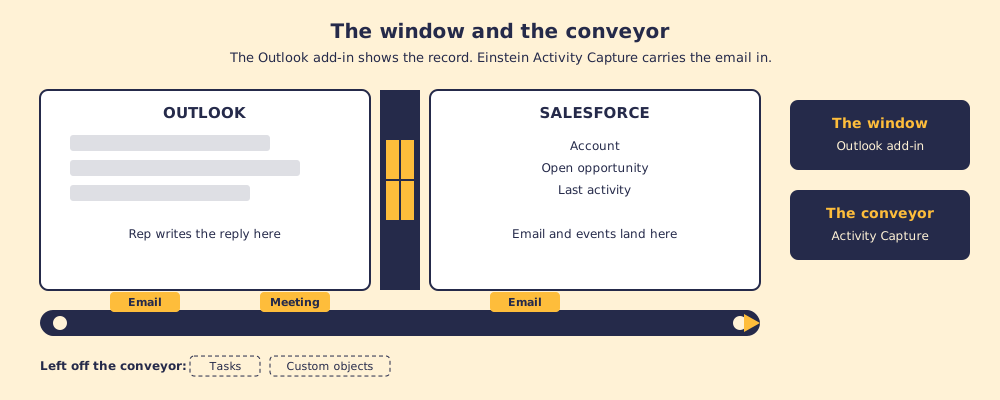
Think of the pair as a window and a conveyor belt. The add-in is a window cut into the wall between Outlook and Salesforce: the rep looks through it and sees the account, the open opportunity, the last activity. Activity Capture is a conveyor running under the floor, carrying email and meetings into Salesforce with no rep involved. A window without a conveyor means reps log by hand. A conveyor without a window means the data arrives but the rep never sees it while writing. You want both.
Is Salesforce for Outlook being discontinued?
Yes. Salesforce for Outlook retires in December 2027 (Salesforce release notes). After that date support ends and compatibility with future Outlook versions is not guaranteed.
The date has moved before. The plugin went into maintenance-only mode in June 2019, meaning bug fixes and no new features, and its retirement was first scheduled for June 2024 before Salesforce pushed it to December 2027 (FlowRunner, 2026). Guides written in 2023 still tell readers it died in 2024. It did not. It is a bridge with a posted closing date, still carrying traffic, and the sensible move is to reroute before the barriers go up.
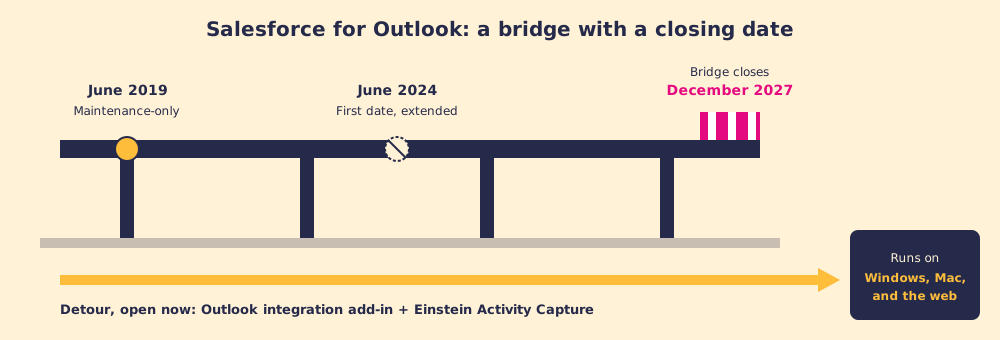
The migration is two products. The add-in, often searched as the Salesforce Outlook plugin, replaces the side panel. Activity Capture replaces the background sync of contacts and calendar events. Two gaps catch admins off guard:
- Task sync. Salesforce for Outlook synced Outlook tasks. Activity Capture and the Outlook integration do not sync tasks (ClonePartner, 2026).
- Where captured email lives. By default, Activity Capture stores captured email outside the standard activity objects, so it does not behave like a normal Salesforce record in every report. Our Einstein Activity Capture guide covers the reporting tradeoffs and the newer option to save email as Salesforce activity.
How do you set up the Salesforce Outlook integration?
Five steps. Plan an afternoon for the admin work and a week for the pilot.
- Turn it on in Salesforce. In Setup, search Outlook Integration and Sync and enable the Outlook integration. While you are there, decide on Activity Capture.
- Deploy the add-in. From the Microsoft 365 admin center, open Integrated apps and deploy the Salesforce add-in to the users or groups who need it. Without central deployment, users install it from Get Add-ins inside Outlook.
- Assign the pane layouts. Choose which fields, related lists, and actions reps see in the email application pane. Fewer fields beat more; the pane is narrow.
- Choose the logging model. Manual logging (the rep clicks Log Email) or automatic sync through Activity Capture. Pick one per team and write it down.
- Pilot, then roll out. Start with 10 to 20 users, check that their email lands on the right opportunities, then go org-wide.

Why is Salesforce for Outlook not working?
When the old plugin stops loading, the cause is usually one of three things, and none of them have a fix inside Salesforce for Outlook itself.
- New Outlook for Windows. Salesforce for Outlook installs as a Windows COM add-in. Microsoft states that “COM add-ins aren’t supported in the new Outlook for Windows, but continue to work in classic Outlook for Windows” (Microsoft Learn). A user who flips the New Outlook toggle loses the plugin.
- No new development since 2019. A maintenance-only product does not chase new Outlook or Windows builds, so updates can break it.
- Wrong platform. It never ran on Mac or Outlook on the web.
If the newer add-in is the one misbehaving, check in this order: the integration is enabled in Setup, the add-in is deployed to that user in the Microsoft 365 admin center, the user has a pane layout assigned, and the user is signed in to the right Salesforce org from the add-in.
Why does logging email not equal running the process?
The add-in captures what happened. It records that an email went out, when, and against which contact and opportunity. It does not flag that the deal has sat in Proposal for 30 days with no next meeting booked, that the economic buyer is still unnamed, or that the recap from the last call never went out. A logged email is a record of the past. The next step is a decision about the future, and the add-in was not built to make it.
In our survey of 198 sales leaders for The State of Sales Enablement, 89% of teams had a defined process and 36% saw reps follow it. Where guidance reached reps inside their workflow, quota attainment was 49%. Where it lived in documents and wikis, 15%.

A 34-point gap is a system property. At 49%, the right action reached reps while they worked. When reps skip the process, the cause is friction and absent guidance, and the fix belongs to the system. The Outlook integration fixes one kind of friction, the copy-paste. It leaves the other kind, knowing what to do next, untouched.
How do the Outlook integration and the behavior layer fit together?
They are not in competition. The Outlook add-in, the Salesforce Chrome extension, and a behavior layer like Supered do different jobs in the same org.

- The inbox job. The add-in and Activity Capture keep email in Salesforce and context in front of the rep.
- The browser job. The best Salesforce Chrome extensions handle prospecting, enrichment, and reading the org on any page.
- The process job. A behavior layer holds the rules for each stage, checks every deal against them, and puts the next step in front of the rep where they are working.

The failure mode is buying the inbox tools, watching activity counts climb, and concluding the process problem is solved. Activity proves reps are working. It does not prove they are working the right motion. CRM adoption improves when logging friction drops; adherence to the sales process needs its own measurement.
What should you do?
Three branches, depending on where you stand:
- Still on Salesforce for Outlook. Move now, while December 2027 is still a planning date. Deploy the add-in, license Activity Capture if your edition needs it, and rebuild any task-sync habit by hand, because tasks will not sync.
- On the add-in, logging by hand. Turn on Activity Capture for the team that sends the most email first, and read the reporting tradeoffs before you promise anyone a dashboard.
- Logging cleanly, process still skipped. More logging will not help. The problem sits in the process job.
Choose the Outlook integration if your problem is friction between the inbox and the CRM; HubSpot teams get the same job from the HubSpot Outlook plugin. Choose Supered if your problem is that reps are not running the process and managers cannot tell who is. Supered rides alongside Salesforce: your stage rules live in it, the next step reaches the rep in the flow of work, and a process board shows the manager which deals are off the rules today, deal by deal. Most mid-market teams have both problems, so they run both.
The how it works page maps the mechanics, and a demo shows the rules running against a real Salesforce org.
What to take from this:
- The default stack. The Outlook integration add-in for what reps see, Einstein Activity Capture for what syncs on its own, Salesforce Inbox only if reps need templates and tracking.
- The retirement date. Salesforce for Outlook retires December 2027, after maintenance-only mode since June 2019 and a first retirement date of June 2024 that Salesforce extended.
- The migration gaps. Tasks do not sync after the move, and captured email is stored outside standard activity records by default.
- The new Outlook trap. Microsoft does not support COM add-ins in the new Outlook for Windows, so the legacy plugin disappears when users switch.
- The adherence gap. In SOSE, guidance in the flow of work lined up with 49% quota attainment against 15% for guidance in documents. Logging more email does not close it; putting the next step in front of the rep does.
Frequently asked questions
What is the Salesforce Outlook integration?+
Is Salesforce for Outlook being discontinued?+
Why is Salesforce for Outlook not working?+
How do I set up the Salesforce Outlook integration?+
Is the Salesforce Outlook integration free?+
What does the Salesforce Outlook integration not do?+
Your process, running itself.