Salesforce Inbox: What It Does, What It Misses, and What Comes Next
Salesforce Inbox puts email templates, open tracking, and calendar availability directly inside Gmail and Outlook.
Here is what it does well, where it stops, and why the behavior layer is the step it cannot take.
Salesforce Inbox is the email productivity layer inside Gmail and Outlook that connects your inbox to Salesforce: templates, open tracking, availability insert, and CRM log, all without leaving your email client.
Salesforce Inbox is the email productivity layer inside Gmail and Outlook that connects your inbox to Salesforce: templates, open tracking, availability insert, and CRM log, all without leaving your email client. That is a genuinely useful job. The question worth answering alongside it is where that job ends, and what begins after.
What is Salesforce Inbox and what does it do?
Salesforce Inbox is the paid productivity layer that sits between Gmail or Outlook and your Salesforce org. It is part of Sales Cloud, surfaced via the Salesforce Inbox app and available on desktop and mobile. The core features break into four jobs.
Email templates. Reps can build and share templates inside the inbox client, pulling in Salesforce merge fields, such as first name, company, or deal stage, so each template personalizes at send. Templates live in Salesforce and flow to the inbox sidebar, so the whole team can use the same library without switching tabs. A rep sending a follow-up after a demo does not need to recompose from scratch every time.
Open and click tracking. Inbox inserts a lightweight tracking pixel and click tracking into outbound email. When the prospect opens the message or clicks a link, the rep sees a notification. Tracking converts email from a one-way transmission into something that carries a signal back. Knowing a decision-maker opened your proposal three times in an hour is a different kind of information than knowing it was sent.
Availability insert. The scheduling feature lets a rep drop a calendar grid into the body of an email. The prospect clicks a slot, and the meeting books directly into both calendars with the Salesforce activity record created automatically. This eliminates the back-and-forth that makes scheduling one of the most expensive small costs in a rep’s week.
CRM logging. Activity, email threads, meeting records, all tied to the right contact and opportunity in Salesforce, captured from the inbox without a second trip to the CRM. The record is updated as a byproduct of sending the email. For account-wide automatic sync beyond the inbox, Einstein Activity Capture handles that logging natively, with its own reporting tradeoffs.

How does Salesforce Inbox compare to the free Gmail and Outlook integrations?
Salesforce sells two tiers of inbox connectivity. The free Gmail and Outlook integrations (available to all Sales Cloud users) handle the baseline job: they log email activity to the CRM and surface the related Salesforce record in a sidebar panel so reps can view contact and deal context without navigating away.
Salesforce Inbox adds the productivity layer on top of it. Templates, tracking, and scheduling do not come with the free integration. If your team’s complaint is “I have to switch to Salesforce to update the record,” the free integration addresses that. If the complaint is “I am rewriting the same follow-up email twelve times a week and I cannot tell if prospects are reading it,” Inbox is the answer. They solve adjacent jobs, and understanding which one you have saves the upgrade conversation.
The Salesforce help documentation is the reliable source for what is bundled in your specific Sales Cloud edition, since the packaging has changed across releases. Check help.salesforce.com before assuming which tier you are on.
Think of the relationship the way you would think of a car’s trim levels. The base model gets you from point A to point B. The next trim adds heated seats and adaptive cruise. Both are driving the same car on the same road. Inbox is the trim that makes the drive more comfortable, not a different vehicle.

What happened to SalesforceIQ Inbox?
SalesforceIQ Inbox is the old name for Salesforce Inbox. The product survived; the SalesforceIQ brand did not. The lineage runs through three names and one acquisition:
- RelateIQ, 2014. Salesforce bought the relationship-intelligence startup RelateIQ in 2014 for about $390 million (Wikipedia). Its trick was reading a team’s email and calendar to work out who knew whom.
- SalesforceIQ, 2015. RelateIQ was rebranded SalesforceIQ at Dreamforce 2015. Its email app shipped as SalesforceIQ Inbox, first for Gmail, then for Outlook on the web on March 10, 2016, at $25 per Sales Cloud user per month (Salesforce).
- Salesforce Inbox, today. The Inbox features moved into Sales Cloud as a native feature. The standalone SalesforceIQ CRM was retired on March 13, 2020, and the legacy Inbox add-in for Outlook and Chrome extension for Gmail were retired in March 2021 (Salesforce Help). As recently as August 18, 2026, Salesforce published guidance telling admins to uninstall the leftover SalesforceIQ Inbox managed package, because Inbox no longer needs it (Salesforce Help).
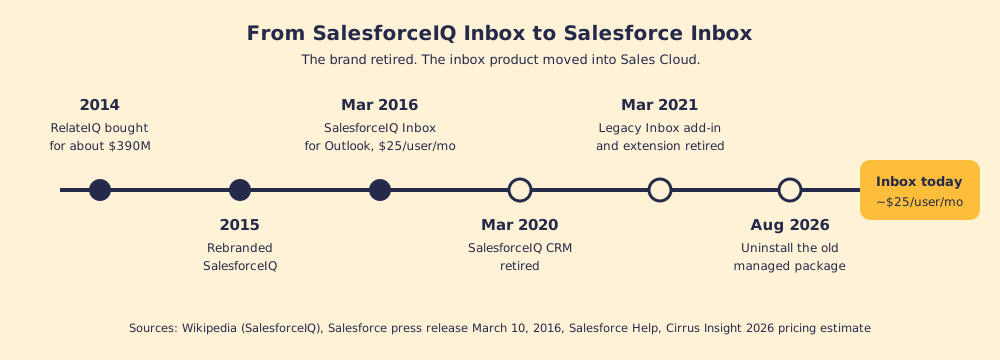
If a review of “SalesforceIQ Inbox” turns up in your research, read the date first. Anything written before 2020 describes a product with a different install path, a different home for its data, and the relationship-scoring features that left with the SalesforceIQ CRM.
How much does Salesforce Inbox cost, and is it being retired?
Salesforce Inbox is not being retired. Two different things are, and they get confused with it constantly:
- Salesforce for Outlook. The old Windows desktop plugin retires in December 2027. It is a separate product from Inbox; our Salesforce Outlook integration guide covers the move.
- The standalone Inbox mobile app. It is gone. Field reps now reach Inbox features through the main Salesforce mobile app (Cirrus Insight, 2026).
On price, Cirrus Insight’s 2026 breakdown puts Inbox at about $25 per user per month as an add-on, or roughly $50 bundled with Sales Cloud Einstein, billed annually. Cirrus Insight sells a competing product, so treat the figures as a starting point, and note its own caveat that Salesforce reshuffled Sales Cloud packaging and raised list prices in late 2025. Confirm with your account executive before you budget.
Two licensing facts decide whether Inbox works for your team at all. Inbox runs on Einstein Activity Capture, so the Einstein Activity Capture setup and its reporting tradeoffs come with it. And the current Gmail and Outlook integrations with Inbox do not support PRM licenses or personal, non-Workspace Gmail accounts (Salesforce Help). A partner team on PRM licenses, or a founder selling from a personal Gmail address, should check that line before signing.
Does the Salesforce Inbox app help reps run the sales process?
Salesforce Inbox tells a rep whether a prospect opened an email. It does not tell a rep whether they have completed discovery, surfaced a champion, or documented why the deal should move to the next stage. It speeds up the tasks inside the inbox. It does not govern the motion across the deal.
This gap is worth naming precisely, because it explains why teams that invest in inbox tooling can still finish the quarter with a stale pipeline. The inbox layer and the behavior layer are adjacent but not overlapping.
The email productivity job asks: did my message land? Can I get a meeting faster? Am I logging this correctly? The behavior layer job asks: is the rep running the right play at this stage? Has the process been followed on every deal in the pipeline? Are we consistent enough to know what is working?
In our survey of 198 sales leaders for The State of Sales Enablement, 89 percent of teams had a defined process and 36 percent saw it followed, and guidance in the flow of work split quota attainment from 15 percent to 49 percent. Templates do not close that gap, and neither does scheduling. It is a behavior gap, and no inbox tool was built to close it.
You can ask “what is salesforce inbox?” and get a clean answer about templates and tracking. The harder question is: after the rep sends that perfectly tracked email from a polished template and gets the meeting booked, does the right thing happen in the deal itself? That is a different system’s job.

What Salesforce Inbox does well, and where to look next
Here is a plain verdict, because the right tool for each job saves time and money.
- Email templates. A clear win. Shared templates with merge fields reduce rewrite time and keep messaging consistent. If your reps are composing the same four emails from scratch every week, Inbox solves this.
- Open and click tracking. Useful signal for reps who want to know when to follow up. Not a substitute for knowing what to say when they do.
- Availability insert. One of the highest-value features for its simplicity. Meeting scheduling friction is real, and eliminating the back-and-forth has a direct impact on how quickly deals advance to the next stage.
- CRM logging. Genuinely valuable. Every piece of email activity captured automatically is a piece a rep does not have to type. Cleaner CRM adoption is a downstream benefit.
If Inbox is already in place and the pipeline is still unreliable, more inbox tooling will not fix it. The behavior layer will. The tools that surface the next step while the rep works, enforce the process in the flow of work, and show a manager adherence by rep and by stage are a separate category from email productivity. They work where Inbox does not reach, at the stage transition, the discovery question, the champion mapping step, the handoff.
If you are weighing what else belongs alongside Salesforce Inbox, the Salesforce Chrome extension guide maps the full range of tools that extend the CRM, and the best Salesforce Chrome extensions post scores them by job so you can match each tool to the problem in front of you. The inbox job and the process job are both worth solving. Each needs a different tool.
What Supered adds that Salesforce Inbox cannot
Supered is the behavior layer. It rides alongside Salesforce and holds the rules for each stage of your process, delivers the playbook in the flow of work, captures the CRM update as a byproduct of working rather than as a separate chore, and makes adherence visible to leaders by rep and by stage. It does not replace Salesforce Inbox, and it does not try to. Templates and tracking are real jobs, and Inbox does them.
Supered adds the layer Inbox cannot reach: whether the rep ran the right motion after sending the email, whether the process was followed across every deal in the pipeline, and whether the manager can see that without auditing by hand. In SOSE, guidance in the flow of work lined up with 49 percent quota attainment against 15 percent for guidance kept in documents. When the open-tracking notification fires and Inbox tells a rep the prospect opened the proposal three times in an hour, Supered surfaces the prescribed next step right there in the flow of work, so the signal becomes an action instead of a guess.
The gap between sending a good email and running a consistent process is the execution gap. See how the behavior layer closes it at how it works, or bring your own pipeline to a demo to see the motion live.
Key takeaways
- Salesforce Inbox, defined. The email productivity layer inside Gmail and Outlook: templates, tracking, scheduling, and automatic CRM logging from the inbox.
- The free baseline. The native Gmail and Outlook integrations handle activity logging and the CRM sidebar. Salesforce Inbox adds templates, open tracking, and availability insert.
- The scheduling win. Availability insert is high-value for its simplicity, removing back-and-forth and booking the meeting in one step.
- The gap. Inbox speeds up email tasks. It does not surface the next deal step, enforce the process, or show adherence by stage.
- The behavior layer. Process execution and inbox productivity are adjacent jobs, not the same job. Both are worth solving, and they need different tools.
Frequently asked questions
What is Salesforce Inbox?+
What does the Salesforce Inbox app include?+
How much does Salesforce Inbox cost?+
What was SalesforceIQ Inbox?+
Is Salesforce Inbox being retired?+
How is Salesforce Inbox different from the Salesforce Gmail integration?+
Does Salesforce Inbox help reps follow the sales process?+
Your process, running itself.