Salesforce Inspector: How to Install It, How to Use It, and What It Cannot Do
Salesforce Inspector Reloaded is the free, open-source admin tool the original Salesforce Inspector became.
How to install it in Chrome or Edge, open it, use it well, judge its security, and see where its job stops.
Salesforce Inspector is a free, open-source browser extension that lets Salesforce admins and developers see every field on a record, run SOQL queries, inspect metadata, and export or import data; the maintained version today is Salesforce Inspector Reloaded.
How to install and open Salesforce Inspector Reloaded in Chrome or Microsoft Edge
5 min- 1
Retire the legacy extension first
If the original Salesforce Inspector is still installed, disable it so Reloaded can migrate your saved queries, then uninstall it. The original is a Manifest V2 extension that Chrome has switched off since July 2025.
- 2
Open the store listing
In Chrome, open the Salesforce Inspector Reloaded listing in the Chrome Web Store (offered by Thomas Prouvot). In Edge, open either the Edge Add-ons listing or the same Chrome Web Store listing; the Chrome Web Store carries the newer release.
- 3
Add the extension and read the permissions
Select Add to Chrome (or Get in Edge), read the permission prompt, which covers cookies and Salesforce domains, and select Add extension. In Edge, if you used the Chrome Web Store, select Allow when asked to allow extensions from other stores.
- 4
Pin it to the toolbar
Open the puzzle-piece Extensions menu and pin Salesforce Inspector Reloaded so the icon stays visible.
- 5
Open Salesforce and click the Inspector tab
Log in to Salesforce and look for the small Inspector tab on the right edge of the page. Click it, or press Alt+I (Ctrl+Option+I on a Mac), to open the popup. The toolbar icon opens it too.
- 6
Fix a blank or unauthorized popup
A blank popup usually means third-party cookies are blocked for Salesforce. An OAUTH_APP_BLOCKED error means your org runs API Access Control, and an admin must install and allow the Salesforce Inspector Reloaded connected app.
Every Salesforce admin has a deal with the org. The deal is this: the org holds everything, but it does not give it up easily. Fields you need are buried behind layouts that were designed for reps, not for the people who have to operate the system. Running a query means opening the developer console, which means switching tabs, which means losing the context you were trying to investigate in the first place. Salesforce Inspector was built to cancel that deal.
Salesforce Inspector is a free, open-source browser extension that lets Salesforce admins and developers see every field on a record, run SOQL queries, inspect metadata, and export or import data without leaving the page. The version to install in 2026 is Salesforce Inspector Reloaded, which carries 500,000 users and a 4.8 rating from 244 reviews on the Chrome Web Store, with version 2.0 listed as updated on September 16, 2026. Some admins call it SFDC Inspector or the Salesforce data inspector; they mean the same extension. It is the free tool of choice for anyone who operates the Salesforce org rather than selling in it; the extension a rep uses on a record is a different category with a different spec.
Below: which version you want, how to install it in Chrome and Edge, how to open it, the jobs it does best, whether it is safe, and the one job it was never built to do.
What is Salesforce Inspector, and which version should you install?
Three extensions share the name, and search results mix them freely. The family tree sorts them out.
- Salesforce Inspector, the original. Soren Krabbe released it in 2013, according to the Salesforce Developers blog, and the repository credits him with Jesper Kristensen. Its last manifest is version 1.14 on Manifest V2, and Chrome’s Manifest V2 timeline switched those extensions off for all users with Chrome 138, followed by Chrome 139 on July 24, 2025. Its old store link now opens an empty page. If you still have it, retire it.
- Salesforce Inspector Reloaded. Thomas Prouvot forked the original and put it on the Chrome Web Store in March 2023; within a year it passed 50,000 users in 126 countries, per the same Developers blog post. The post’s author bio lists Prouvot as a senior technical consultant at Salesforce, and the post still says plainly that the extension “is not an official Salesforce solution.” It is MIT-licensed, rebuilt on Manifest V3, and ships for Chrome, Edge, and Firefox from one GitHub repository.
- Salesforce Inspector Advanced. Olivier Dufour forked separately because, in his words on the project site, “I do not share the same vision” as Reloaded. His goal is to “kill dev console needs” with an Apex runner, SOSL, and log tools. Its Chrome listing shows 60,000 users, a 4.4 rating from 24 reviews, and version 1.41.
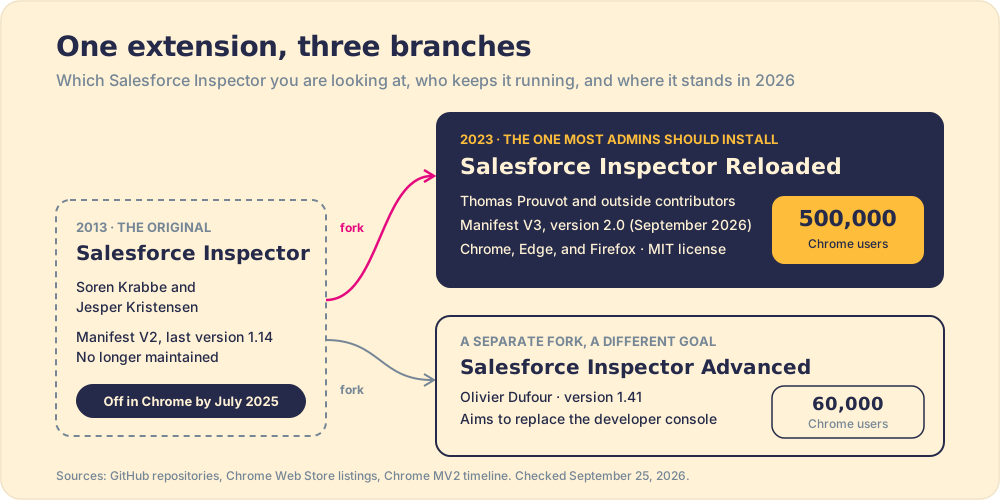
| Version | Maintained by | Chrome users | Rating | Current state |
|---|---|---|---|---|
| Salesforce Inspector (original) | Soren Krabbe, Jesper Kristensen | Listing removed | n/a | Manifest V2, off in Chrome since July 2025 |
| Salesforce Inspector Reloaded | Thomas Prouvot and contributors | 500,000 | 4.8 (244 reviews) | Version 2.0, September 16, 2026 |
| Salesforce Inspector Advanced | Olivier Dufour | 60,000 | 4.4 (24 reviews) | Version 1.41, September 22, 2026 |
Our pick: install Reloaded. It has roughly eight times the users of Advanced, the larger contributor base, and a documentation site that answers most questions before you ask them. Advanced earns a look if you are a developer who wants to run anonymous Apex from the browser.
How do you install the Salesforce Inspector Chrome extension?
Five minutes, and most of that is reading a permission prompt. Google’s install steps apply as written.
- The listing. Open Salesforce Inspector Reloaded on the Chrome Web Store. Check that it says “Offered by Thomas Prouvot”; several lookalikes with similar names share the search results.
- The install. Select Add to Chrome, read the prompt, and select Add extension. The manifest asks for two permissions, cookies and storage, and host access limited to Salesforce domains such as salesforce.com and force.com.
- The toolbar. Open the puzzle-piece Extensions menu and select Pin next to Salesforce Inspector Reloaded, so the icon stays in reach.
- The old version. If the original Salesforce Inspector is still installed, the welcome page suggests disabling it first so your saved queries can migrate, then uninstalling it.
Firefox users get the same extension from Firefox Browser Add-ons.
How do you install Salesforce Inspector in Edge?
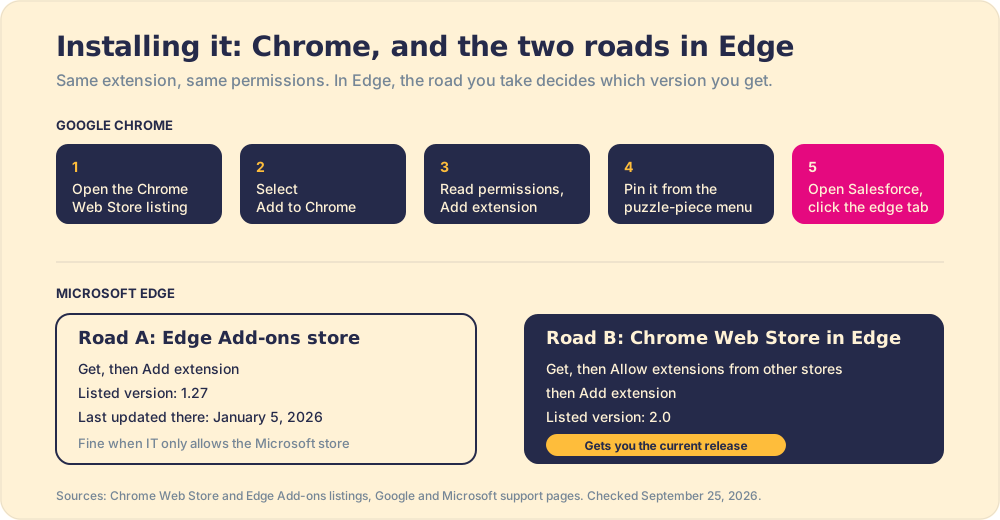
Edge runs on Chromium, so the extension works unchanged. The choice is which store you pull it from, and the two stores do not carry the same version.
- Road A, the Edge Add-ons store. The Salesforce Inspector Edge listing is the same developer, with 161,749 active installs. Select Get, then Add extension. When we checked on September 25, 2026, it listed version 1.27, last updated January 5, 2026.
- Road B, the Chrome Web Store inside Edge. Microsoft’s support page documents it: open the Chrome Web Store in Edge, select Get, choose Allow when Edge asks to allow extensions from other stores, then Add extension. This road gets you version 2.0, with the Flow Scanner, Logs Viewer, and multi-tab Data Export.
Take Road B unless your IT team blocks other stores, in which case Road A still does the core work.
How do you open Salesforce Inspector?
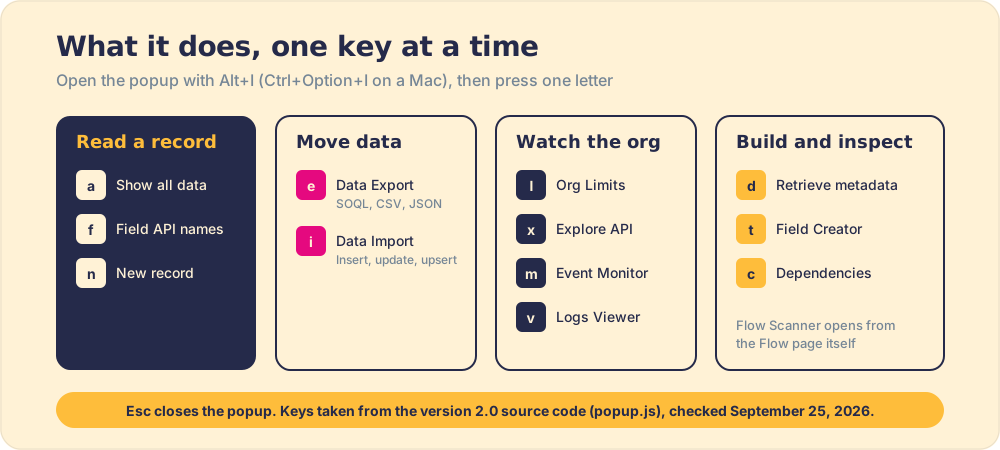
Log in to Salesforce and look at the right edge of the page. A small tab sits there, and clicking it slides the popup open. The button’s own tooltip in the source code names the keyboard route: Alt+I, which on a Mac becomes Ctrl+Option+I. The toolbar icon opens the popup too. You can move the tab or turn it horizontal in Options if it covers something you need.
The popup has four tabs. Object shows the record or object you are on, Users finds a user (and offers Login as), Shortcuts searches Setup pages and metadata, and Org shows instance details. From there, one letter opens each tool. The key map below comes from the version 2.0 popup source.
| Key | Opens | Key | Opens |
|---|---|---|---|
| a | Show all data | l | Org Limits |
| f | Field API names on the page | x | Explore API |
| n | New record | m | Event Monitor |
| e | Data Export | v | Logs Viewer |
| i | Data Import | d | Retrieve metadata |
| t | Field Creator | c | Dependencies Explorer |
| o, u, s, r | Object, Users, Shortcuts, Org tabs | Esc | Close the popup |
Two more are worth the muscle memory. In Data Export, put the cursor between SELECT and FROM and press Ctrl+Space to insert every field you can see, per the Data Export docs. And the extension registers browser-level commands (Open popup, Data Export, Run Query, and more) with no keys assigned, so you can bind your own at chrome://extensions/shortcuts or edge://extensions/shortcuts.
How do you use Salesforce Inspector for everyday admin work?
Open any record and press a. Show all data lists every field on that record, including the ones hidden by the page layout, the ones marked internal-only, the ones your admin buried three permission sets deep, each with its label, API name, type, and value. You see the raw data the way the database sees it. No switching tabs, no running a report, no asking someone who has a different permission level.
Think of it as a flashlight pointed into the back of the drawer. The record was always there; the tool removes the need to move furniture to reach it.

Learning how to use Salesforce Inspector comes down to a handful of jobs. The ones admins reach for most, in the order they tend to learn them:
- Field API names and hidden values. Show all data (a) for the full field list, or f to stamp API names onto the Salesforce page itself. You can edit values in place and save them, which beats editing the layout to fix one record.
- Field usage. From Show all data, Reloaded can show the percentage of records holding a value for each field, per the project README. It is the fastest way to find the custom fields that sit empty on almost every record.
- Data export with SOQL. Press e, write a query with field autocomplete, and export the results to CSV, Excel, or JSON. Version 2.0 keeps several query tabs open at once and can prefill the query from the list view you came from.
- Data import. Press i, paste from Excel or load a CSV, map the columns, and run Insert, Update, Upsert, Delete, or Undelete. You can set assignment and duplicate rule headers, and switch the API type to Tooling to bulk-deactivate flows, as the how-to page walks through.
- Org limits. Press l for a gauge of every limit the org is consuming, API requests included, with a refresh button.
- REST and metadata. Explore API (x) and the REST Explorer send authenticated requests with templates; Retrieve metadata (d) builds a package.xml and pulls or deploys it.
- Flow Scanner. New in the 2.x line and opened from a Flow’s page, it runs the open-source Lightning Flow Scanner rules against the flow and groups findings as Error, Warning, or Info, per the Flow Scanner guide.
Here is a query worth saving, because it ties the tool to the argument later on this page. It lists every open opportunity with a blank Next Step:
SELECT Id, Name, Owner.Name, StageName, CloseDate
FROM Opportunity
WHERE IsClosed = false AND NextStep = null
ORDER BY Owner.Name
Run it on Monday and you know how many deals have no written next step, and whose. That is a real answer to a real question, delivered in about ten seconds. Hold on to the query; it comes back.
The Salesforce developer documentation at https://developer.salesforce.com/ covers the SOQL and SOSL languages Inspector exposes. If you are learning the syntax, that is the canonical reference.
Is Salesforce Inspector free, and is it safe?
Free, yes. Reloaded is MIT-licensed with no paid tier, and Advanced is free as well. The cost it does carry is API usage. The Developers blog warns that “using it consumes API calls, so be mindful of limits,” and your org’s daily allocation is the same pool your integrations draw on.
Safety takes one picture. Picture a colleague who borrows your office badge for the afternoon. Every door your badge opens, they can open. The doors your badge cannot open stay shut, however hard they push. That is the extension’s security model, stated in the README: it “communicates via the official Salesforce webservice APIs on behalf of the currently logged in user,” it reuses your browser’s session, and it reads Salesforce cookies to get that session. No data goes to other parties, the README says, and the project invites you to “inspect the source code, monitor the network traffic in your browser or take my word.”
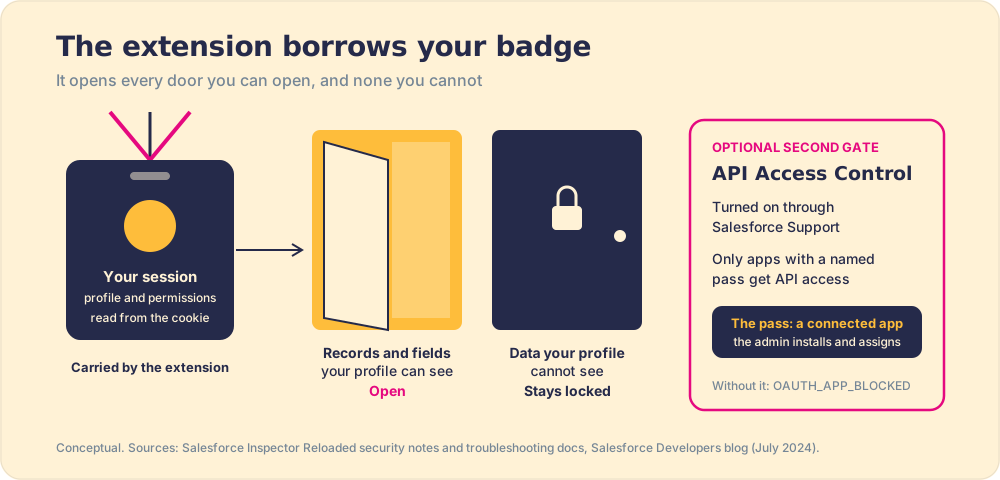
The picture has an edge, and it is worth drawing precisely. A borrowed badge is only as safe as the badge. A system administrator’s session reaches everything, so a system administrator running any extension is lending everything. Three facts matter to the admin deciding whether to allow it:
- No official status. Salesforce does not support it; the Developers blog says development and support “is not the responsibility of Salesforce.” It is a browser extension, not an AppExchange package, so AppExchange security review does not apply to it.
- API Access Control. The Developers blog recommends asking Salesforce Customer Support to enable API Access Control, which limits API access to approved apps. Reloaded then works through its own connected app, which an admin installs and assigns by profile or permission set.
- A readable failure. If API Access Control is on and the app is not allowed, the troubleshooting page says the OAuth flow returns OAUTH_APP_BLOCKED. A blank popup is usually third-party cookies being blocked.
Our view: allow it for admins and developers, turn on API Access Control if your security team wants a list of who holds the badge, and keep it off rep machines, where it has no job to do.
Who should use Salesforce Inspector Reloaded?
Admins and developers. Full stop.
The tool was built for people who operate the org, configure it, debug it, and maintain it. A Salesforce admin checking a validation rule, a developer tracing a flow, a solution architect confirming field values after a data migration, a RevOps analyst spot-checking record states: these are the users Inspector was made for. It earns its place in any Salesforce Chrome extension toolkit and takes a straight A in our graded roundup of the best Salesforce Chrome extensions, where it sits in the admin category of the wider set of Salesforce productivity tools.

A sales rep who wants to update a field faster, or a manager who wants to know why deals stall, is not the audience. The tool is easy enough; the job it does is not their job. The org reading job and the rep behavior job are separate problems, and they require separate tools.
What Salesforce Inspector cannot do
Now the turn.
Salesforce Inspector reads the org. It does not change what reps do inside it.
Go back to the Monday query. It told you which open deals have no next step and whose they are. What it cannot do is put the next step in front of the rep while the buyer is still on the phone, surface the playbook when they are about to skip discovery, or tell a manager which reps followed the process last week and which did not. Those are not Inspector problems. They are behavior problems, and Inspector was never built to solve them.
The two jobs get confused because they touch the same fields. A team with a clean org and a well-configured field layout still has the behavior problem if reps are not running the process. A fast SOQL query tells you what the data says; it does not change what generated the data. Reading is one job. Behavior is another.
Accurate.
In our survey of 198 sales leaders for The State of Sales Enablement, 89 percent of teams had a defined process and 36 percent saw it followed, and guidance in the flow of work split quota attainment from 15 percent to 49 percent. No metadata inspector touches that variable. The gap between a process that exists in the org and a process that reps run is the gap the tool cannot close. The blank Next Step field is a symptom of a system that asks for the update after the work, away from the work; Salesforce data quality decays for the same reason.
What closes the behavior gap?
The behavior layer. Supered is the behavior layer that rides alongside Salesforce: it surfaces the next step of your process in the flow of work, delivers the playbook while the rep is working, captures the CRM update as a byproduct, and makes adherence visible deal by deal. When the Monday query shows a next-step field blank on forty open opportunities, Supered is the tool that makes blanks rare in the first place, because the rep sees the required step in the moment they are on the record, not after the fact when a manager runs a query. The full argument is in the Salesforce Chrome extension guide and the broader pattern is in the sales process guide.
The two tools are not in competition. An admin who uses Inspector to operate the org and a team that uses Supered to run the process are doing different things, and both things matter. The mistake is believing the first one is a substitute for the second. The same trap catches Einstein Activity Capture, which records what happened but not what happens next: a clean log of the past is not a running process.

What to use and when
A recap of where each tool wins:
- Salesforce Inspector Reloaded. Install it if you are a Salesforce admin, developer, or GTM engineer who needs to query records, inspect metadata, and move data without a separate environment. Free, open source, 500,000 Chrome users, and the best tool in its category by a wide margin. In Edge, pull it from the Chrome Web Store for version 2.0.
- Salesforce Inspector Advanced. The developer’s alternative, for someone who wants anonymous Apex and SOSL in the browser more than a polished admin popup.
- The native Salesforce developer console. Still the home for complex scripting and debugging. Inspector replaces it for the most common query and field inspection work, not for everything.
- The behavior layer for process adherence. If the question is whether reps are following the sales process and what to do when they are not, that is a different purchase and a different category. Inspector tells you the state of the data. The behavior layer changes the state of the rep.
For reading and operating the org, Salesforce Inspector Reloaded is the free standard, and nothing in this category comes close. For changing what reps do next, the behavior layer is the tool. The sales productivity guide covers how these categories fit together in a larger stack. Book a demo to see Supered running against a real process and what the behavior layer adds where Inspector stops.
Frequently asked questions
What is Salesforce Inspector?+
Is Salesforce Inspector free?+
How do I open Salesforce Inspector?+
How do I install Salesforce Inspector Reloaded in Microsoft Edge?+
Is Salesforce Inspector safe to use?+
How do you use Salesforce Inspector to find field API names?+
What is the difference between Salesforce Inspector Reloaded and Salesforce Inspector Advanced?+
What is the difference between Salesforce Inspector and the behavior layer?+
Your process, running itself.