Knowledge Management Tools: Mapped by the Job They Do
A toolbox full of knowledge management tools, and the hardest job still undone. Map them by the job each does, and one open slot stands out clearly.
Knowledge management tools are the software a team uses to write, store, find, deliver, and capture its know-how, and they are best understood not as a category to shop but as five separate jobs, only one of which is still unsolved.
Open the cupboard where a company keeps its knowledge management tools and you find a crowded shelf. A wiki for writing things down, a knowledge base for keeping them, a search bar that has lately grown an AI that answers in full sentences, and a tool that records calls and harvests what the best people know. Every one does its job well, and the shelf is full and tidy. And the work still goes wrong the same old way: the rep with three deals open and the buyer waiting cannot recall the pricing rule, and the answer sits on that shelf, unopened.
That is the puzzle worth sitting with. We have never had better tools for handling what a company knows, and people still lose a fifth of their week looking for what someone wrote.
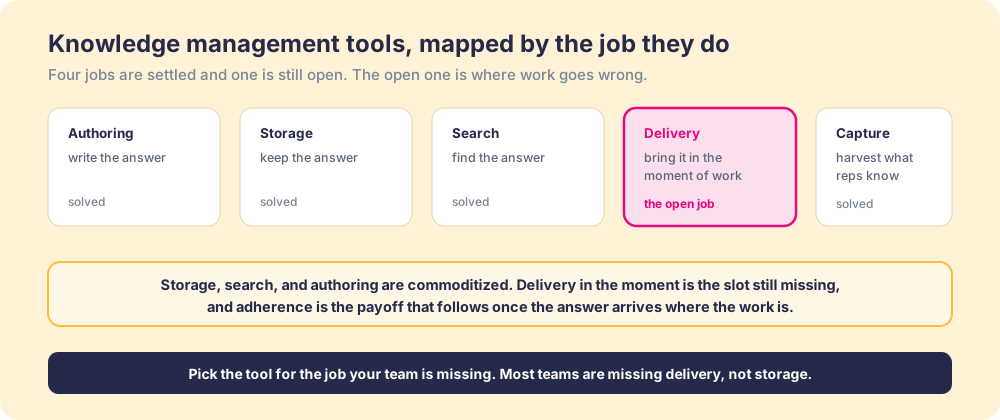
So this is not a roundup. We will map knowledge management tools by the job each one does, because once you see the jobs apart, a pattern shows up that no feature comparison reveals: four are solved and cheap, one is wide open. The open job is delivery, getting the answer to the person in the moment of the work, and most teams keep buying for the jobs they have covered.
What are knowledge management tools at heart?
Strip away the marketing and a knowledge management tool does one of five things: write an answer, keep it, find it, deliver it to the person who needs it while they work, or pull it from the heads of those who already have it. A single product often claims several, which blurs the one distinction that matters: the five jobs are not equally hard, nor equally finished.
Think of a kitchen. You can have a beautiful pantry, a labeled spice rack, and a recipe box thick with cards, and still serve a cold, late dinner, because none of those is the act of cooking. The pantry is storage. The recipe box is your knowledge base. The cooking, the right move at the right second with the pan hot, is delivery, the only part the guest tastes.
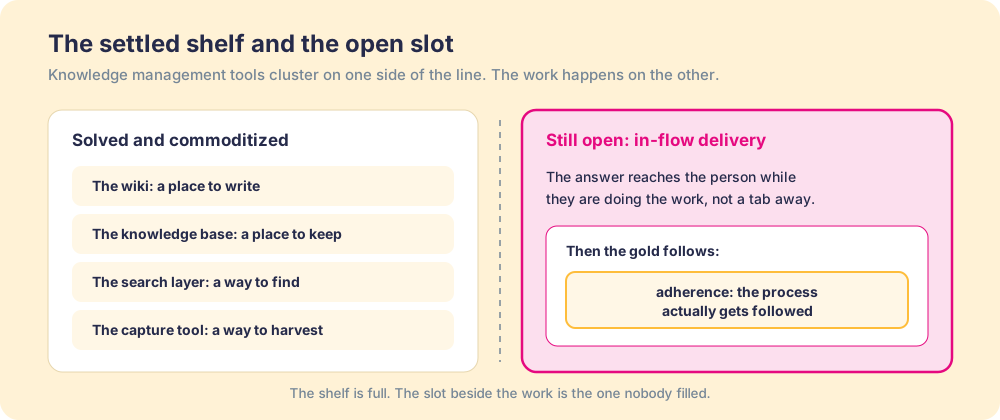
Most teams shop the category as one decision. It is five, in different states of repair.
Which knowledge management tools are worth knowing?
Here is the field, sorted by job rather than by logo, each worth knowing for what it does best and the wall it hits. Read it as a map, not a ranking.
- The wiki, or authoring tool. The blank page that invites a team to write down how things work, and the modern versions make writing and linking almost frictionless. Its strength is creation. Its limit is that a wiki rewards writing and does nothing to reward reading, so a page nobody opens looks the same as one that closed a deal.
- The knowledge base software. The organized home for answers, sorted into categories a reader can browse. It is the backbone of any internal knowledge base, and the mature products do structure and permissions well. Its limit is that it is a destination. The moment going there costs a tab switch in the middle of live work, friction wins.
- The enterprise search, or AI answer layer. The retrieval job: the index across every system and, lately, a model that reads your content and replies in plain language. Its strength is real, and it is the part of the field improving fastest. Its limit is patience, because it waits to be asked. For the rep mid-deal who does not pause to wonder, it never gets the chance.
- The digital adoption, or in-flow delivery layer. The open slot: the tool that surfaces the answer inside the application where the work is happening, prompted by what the person is doing rather than a search they remember to run. Its strength is the one nobody else covers, closing the gap between knowing and doing. Its limit is that it is the youngest lane, which is why most knowledge management software stacks carry a strong base and search and a hole right here (the best digital adoption platforms maps it in full).
- The capture tool. The harvester: the call recorder and the prompt that pull what your best people do into something the team can use. Its strength fits a deep truth, that the best process already lives in your strongest reps, and capture is how you get it out of their heads. Its limit is that a captured answer is still raw material, and recording the master is not the same as teaching the apprentice.
Notice what runs under the list. Four of these jobs, authoring, storage, search, and capture, are served by tools that are mature and cheap. One is not. That asymmetry is the real shape of the market.
Why is storage solved and delivery still open?
Because the two jobs differ in kind. Storing an answer is a problem of order: put it somewhere, label it, make it retrievable. That yields to good software, and it has. Delivering an answer is a problem of timing: get the right thing in front of the right person at the second they need it, without making them leave the work to get it. That is a behavior problem wearing a software costume, and behavior does not yield to a better filing cabinet.
The data has pointed here for years, and nobody acted because the loss is invisible. The McKinsey Global Institute estimated that workers spend close to a fifth of the week searching for and gathering information (McKinsey Global Institute). Panopto’s workplace study landed near the same place, putting the loss at roughly 5.3 hours a week chasing knowledge a colleague already held (Panopto, Valuing Workplace Knowledge). Those hours do not vanish because the base is tidy. They vanish because the answer is one tab away.
A stack that looks complete keeps disappointing because it built the parts you can see and skipped the part you can only feel, whether the answer showed up while it mattered. The recipe card carries the dish, never the timing, and timing is the whole job.
How do you choose knowledge management tools by the job you are missing?
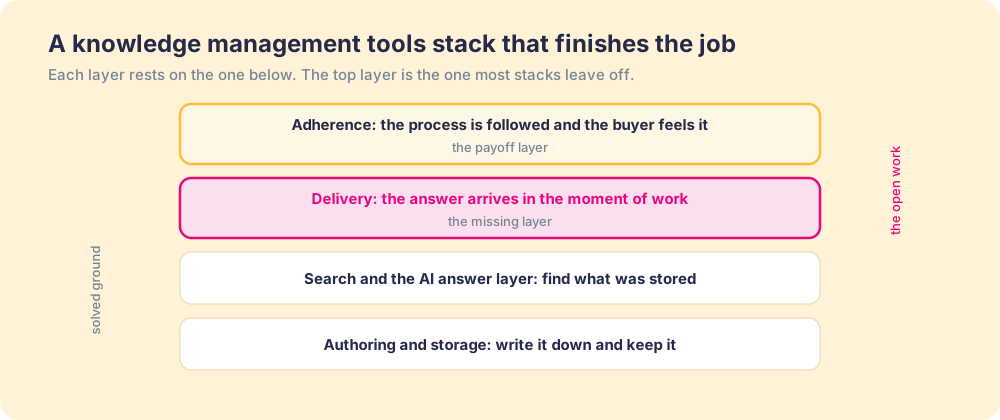
You start by being honest about which jobs you have covered, which is harder than it sounds, because a tidy base feels finished. Walk the five and mark the real state of each.
- Authoring. A team with no shared place to write needs a wiki first, and few teams stay there for long. This is rarely the missing job.
- Storage and structure. If answers exist but live scattered across chats and drives, the knowledge base is the buy, and it earns its keep by making one trusted home. Many teams stop here.
- Search and retrieval. If answers are stored but unfindable, a search or AI answer layer is the fix. The trap: it still waits to be asked, raising the ceiling for the person who pauses and doing nothing for the one who does not.
- Delivery in the flow. If people store and search fine and still bleed hours, this is the missing job, and another base will not touch it. This is where the McKinsey and Panopto hours vanish.
- Capture. If the know-how that matters sits in two veterans’ heads, capture comes first, with the same caveat: it still has to be delivered.
Run that walk honestly and, for most mid-market teams, the gap lands in the same place. Storage is fine. Search is fine. The hole is delivery, because nobody bought for the missing job. It is the lesson behind every knowledge sharing push that went nowhere and every sales knowledge base built and ignored: the artifact was never the problem.
The mechanism is worth naming, because it lets you reason from the verdict without us in the room. Knowledge is solved. Any person, and now any model, can find the document. What a person does in the moment of the work is the part that did not get solved, the part that moves the number. A tool that only stores and finds works the solved side of the line, so more of it changes little.
The payoff of filling that slot is large. Our State of Sales Enablement found that teams whose guidance reaches the rep in the flow of the work hit quota at 49 percent, against 15 percent for teams whose knowledge sits in a separate place to be looked up (The State of Sales Enablement). Same stored answers, opposite results, and the only difference is whether the answer arrived where the work was.
What we recommend
There are two ways to spend a knowledge management budget. You can buy more of the solved jobs, a better wiki, a tidier base, a sharper search, hoping enough storage becomes delivery. Or you can buy for the missing job, which for most teams is delivery: the answer surfacing in the moment of the work, prompting the next action, without leaving the task.
We recommend the second. The solved jobs are solved, which is why pouring more money into them returns so little. The hours McKinsey and Panopto measured come from answers that never reached anyone in time, and the distance between guidance in the flow and knowledge parked elsewhere is the gap between 49 percent quota attainment and 15 percent.
So audit by job before you shop by brand. Find the open job and buy there. For most teams the shelf is full and the slot beside the work is empty, and the tool that fills it makes the others pay off. Start with the internal knowledge base, then read the best digital adoption platforms for the lane that closes it, the best knowledge base software for a knowledge-base-specific breakdown, and Guru alternatives for the governed-answer category.
Frequently asked questions
What are knowledge management tools?+
Which knowledge management tool should I buy first?+
What is the difference between knowledge management software and a knowledge base?+
Why do teams with good knowledge management tools still waste time?+
Do AI answer tools replace knowledge management tools?+
Your process, running itself.