HubSpot Tasks and Task Queues: How They Work and Where They Stop
How HubSpot tasks and task queues work in 2026: creating tasks, the 20-queue limit, shared queues, overdue and repeating tasks, workflow automation, and the limit of any task list: it reminds, it does not guide.
HubSpot tasks are to-do items attached to contacts, deals, or companies in HubSpot CRM, used to track calls, emails, and follow-ups. HubSpot tasks queue those items into ordered lists a rep works through in sequence.
HubSpot tasks are among the most used and least explained features in the CRM. The pieces are simple once you see how they connect: a task is one reminder attached to one record, and a hubspot tasks queue is a playlist of those reminders that a rep presses play on and works in order. This guide covers how tasks work in 2026, how to build and share queues (and the limits HubSpot sets on them), what happens when a task goes overdue or repeats, how workflows create tasks for you, and then the limit of any task list, the one job it cannot do on its own.
What are HubSpot tasks and how do you create them?
A HubSpot task is a structured to-do item attached to a contact, company, or deal record (HubSpot also lets you save a task with no record attached, which is how orphan tasks happen). It has a type, a due date, an owner, a priority, and an optional note for context you want the rep to see when the task loads.
To create one by hand, open a record, go to the activity area, and create a task; you can also create tasks from the Tasks index page under CRM, in bulk from a list view, or automatically from a workflow or sequence. HubSpot’s create tasks article (last updated September 21, 2026) lists the types:
- Call tasks. Load the HubSpot calling tool and the contact’s number when the task opens. The call logs on completion.
- Email tasks. Open the compose window inside the task. The email logs to the record when it sends.
- To-do tasks. The general-purpose reminder: send a contract, update a field, chase a signature.
- LinkedIn Sales Navigator tasks. “Send InMail” and “Connection request” task types, for teams with the Sales Navigator integration.
Each task also carries a priority (low, medium, or high), an email reminder you can time before the due date or switch off with “No reminder,” and an optional repeat interval. Repeated tasks “keep the same title, assignee, notes, and associations,” which makes them the right tool for a monthly account check-in and the wrong tool for anything whose content changes each time.
How does a HubSpot tasks queue work?
A hubspot tasks queue groups tasks so a rep can work through them in one focused session. HubSpot Academy’s certification quiz asks reps to fill in the blank, “Task queues in HubSpot work similar to ___,” and the correct option is a music playlist. The comparison is exact. The tasks sit in a set order, the rep presses start, each task loads with its record the way the next song loads on its own, and the rep skips or completes and keeps moving.
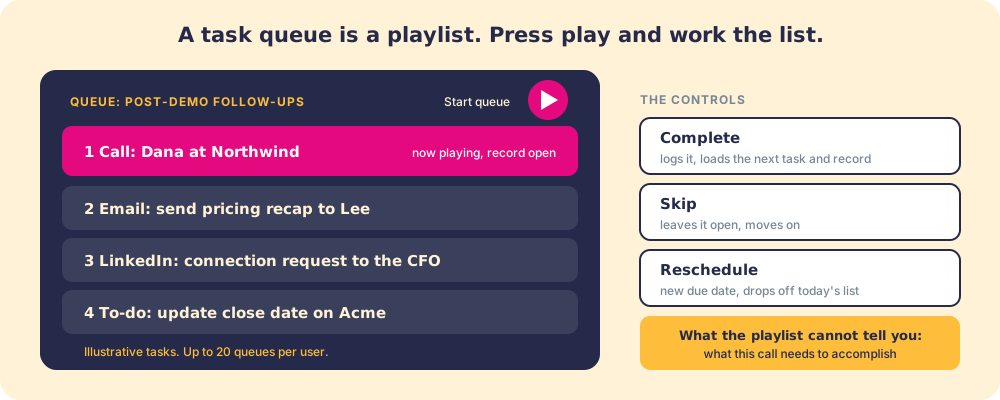
The setup, from HubSpot’s use task queues article (last updated August 13, 2026):
- Create the queue. Go to CRM > Tasks, click Actions > Manage queues, then “Create task queue.” Name it for the job it does: “Post-demo follow-ups,” “Overdue proposals,” “Inbound callbacks.”
- Choose access. Keep it private or invite other users. Shared queues “can be edited or deleted only by the user that created the queue, or by super admins added to the queue,” so decide who owns the team queue before three managers each build their own.
- Fill it. Add tasks to the queue when you create them, move them in bulk from the Tasks view, or point a workflow or sequence at it. When a workflow or sequence adds tasks to a shared queue, “all of those users can view and complete these tasks.”
- Work it. Open the queue and start. Each task loads with its record and the call or email tool it needs. Complete, skip, or reschedule, and the next task loads.
Three facts shape how you design queues. Queues need Sales Hub or Service Hub Starter or above. “Each user can create up to 20 task queues in an account,” which is plenty for a rep and tight for a manager who builds one per campaign. And on Sales Hub Professional and Enterprise, the sales workspace adds a prospecting queue that pulls tasks, sequence tasks, and HubSpot’s guided actions into one list, for users with an assigned Sales seat (use the prospecting queue).
What happens when a HubSpot task is overdue?
Nothing automatic happens to the task itself. If the owner set a reminder, HubSpot emails them before the due date. When the due date passes without completion, the task stays open and shows as overdue until someone completes, reschedules, or deletes it. HubSpot does not escalate it to a manager, reassign it, or close it.
Repeating tasks behave differently, and the difference catches teams out. For a repeating task, “A new task will be created if the previous task is completed, deleted, or becomes overdue.” A rep who ignores a weekly repeating task does not get one overdue task; they get a new one each week while the old ones pile up in the overdue view.
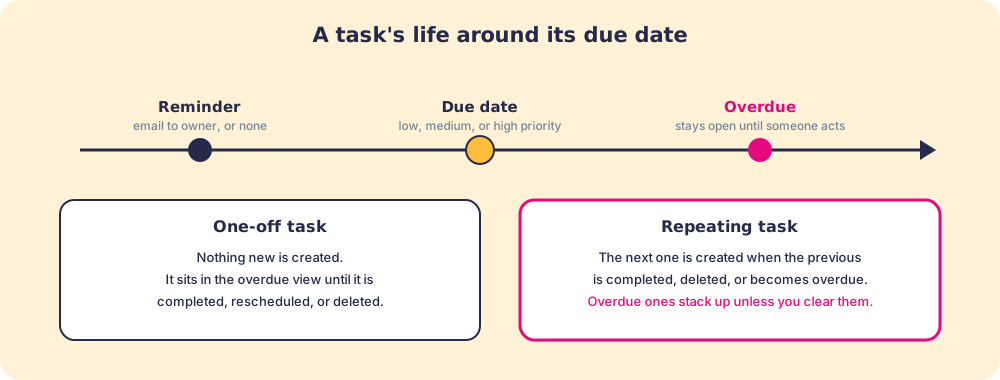
The practical rule for hubspot task management: filter the Tasks view to overdue every morning and clear it to zero, or the overdue list stops meaning anything. A list of forty overdue tasks is a list the rep stops reading.
How to use HubSpot tasks with workflow automation
Knowing how to use hubspot tasks by hand is one skill. Knowing when to let the system create them is the other.
HubSpot workflows can create tasks on any enrollment trigger: a deal stage change, a property update, a form submission, a date. The Create task action sets the type, the due date offset (three days after the trigger, one hour after enrollment), the notes, the queue, and the owner, including the record owner with one toggle. Workflow limits depend on plan: Sales Hub Starter includes up to 50 workflows with restricted triggers and actions, Professional up to 300 (Sales Hub pricing, checked October 1, 2026).
The patterns that earn their keep:
- Stage-exit reminders. When a deal moves to Proposal Sent, a workflow creates a call task due in two days for the owner, in the “Post-demo follow-ups” queue. The follow-up stops depending on memory.
- Re-engagement triggers. When a contact has had no activity for fourteen days, a workflow creates a to-do for the owner. Inactivity stops being invisible.
- Form submission routing. When a demo request arrives, a workflow creates a call task for the assigned SDR in the inbound queue.
HubSpot’s workflow actions documentation lists the Create task parameters in full. Tasks created by workflows also show up in the HubSpot Chrome extension, so the rep sees what is due without opening the full CRM.
What does a task not carry?
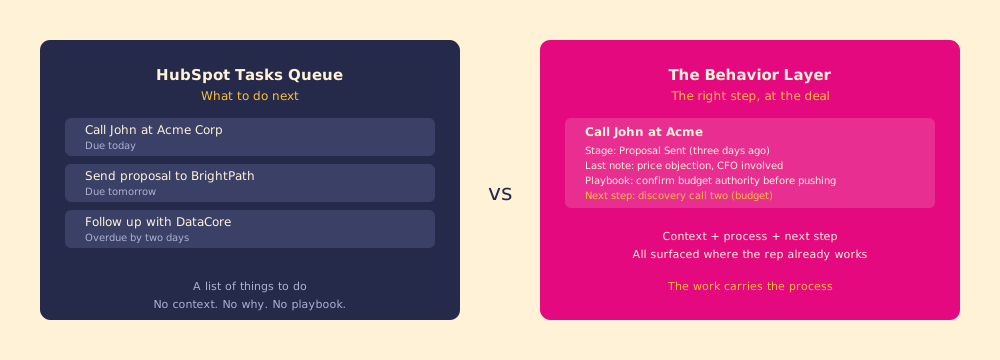
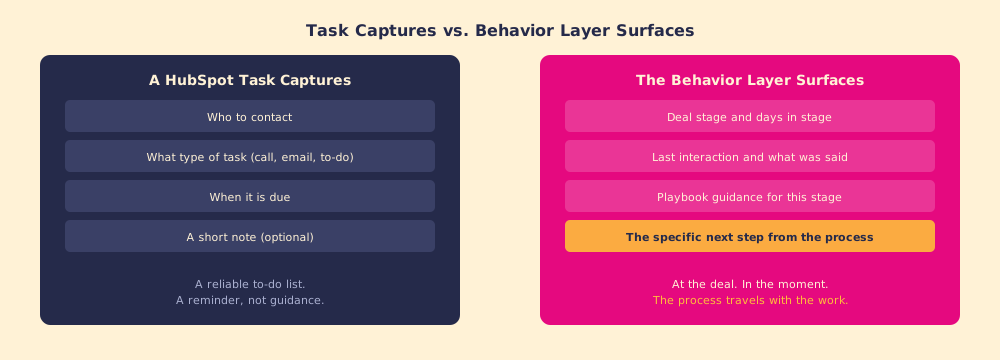
The task form captures who to contact, what kind of action, when it is due, and a note. It does not capture where the deal stands, what happened in the last conversation, what the playbook says to do at this stage, or what the right next move is given the buyer’s position.
A rep who opens “Call John at Acme” knows to call John. They do not know that the deal has sat in Proposal Sent for eleven days, that the last call surfaced a budget objection from the CFO, that the playbook for this stage says to confirm budget authority before discussing timeline, or that the manager would rather the next call be with the CFO than a push to close.
That context lives somewhere: in call notes, in the deal record, in a playbook document. The rep has to go find it before the call, or improvise without it.

This is not a HubSpot flaw in the narrow sense. Tasks are designed to answer “what and when,” not “why and how,” and every task-based system shares the gap. It also explains why CRM adoption fails so reliably: the tools ask reps to hold the process in their heads, and under the load of a full pipeline, the head loses.
Why does the task list fall short when the process is complex?
A task list works well when the action is simple and the context is stable. Call this list. Send this follow-up. Those are the right jobs for a playlist.
It becomes a constraint when the process has dependencies: what you do next depends on what the buyer did last, what stage the deal is in, and what the playbook says for that combination. A list cannot hold that logic. It can tell you what to do; it cannot tell you how to do it correctly given where things stand.
The usual fallback is the manager, who carries the logic in their head and checks deals by hand. In our survey of 198 sales leaders for The State of Sales Enablement, that fallback breaks with span of control: at one to five reps per manager, 47 percent of teams reported 76 to 100 percent process adherence; at six to eight reps, 23 percent. The most cited reason reps skip the process was that managers do not enforce it (29 percent). The managers in that survey were short on hours, and a task list does not give them any back.
The behavioral research explains why the moment matters. Peter Gollwitzer’s work on implementation intentions shows that plans of the form “Whenever situation x arises, I will initiate the goal-directed response y!” close the gap between intending and doing, and a 94-study meta-analysis by Gollwitzer and Sheeran found a medium-to-large effect (d = 0.65) on goal attainment (Gollwitzer, implementation intentions). A task is half of that plan: it names the situation. The “I will initiate y” half, the specific step the process calls for, is the part that has to arrive with it.
BJ Fogg’s Behavior Model reaches the same place from the other side: behavior happens when motivation, ability, and a prompt arrive at the same moment (Fogg Behavior Model). A task is the prompt. The rep’s motivation is usually there. What fails is ability, which Fogg defines as how easy the right action is in the moment. If running the correct step means opening a separate document, finding the section, and holding the instruction while dialing, ability collapses under load.
What does the Behavior Layer do that the task list cannot?
The Behavior Layer does not replace tasks. Tasks still handle scheduling, assignment, reminders, and routing. The difference is in what the rep sees when the task comes up.
With tasks alone, the rep sees: Call John, due today.
With Supered running inside HubSpot, the rep sees the call task plus the deal stage, the days in stage, the note from the last call, the playbook guidance for this stage, and the step the process says to take next. All of it surfaces inside the CRM, in the record the rep already has open, with no extra tab and no document to dig through. Supered checks open deals against your rules and turns a missed step into a flagged deal, so the manager sees the overdue follow-up without auditing forty task lists.
A reminder tells you to do something. Guidance tells you what to do and how to do it correctly given where things stand.
The sales productivity math follows. A minute spent hunting for context before a call is a minute subtracted from selling, and a call made without that context is a rep improvising instead of running the motion that works. Across a pipeline of forty deals, the improvisations compound. The task queue keeps the rep moving. The Behavior Layer keeps them moving in the right direction.
A quick recap
- Tasks. Call, email, to-do, and Sales Navigator task types, each with a due date, owner, priority, and optional reminder and repeat.
- Task queues. A playlist of tasks worked in order with one click to start; Starter and up, up to 20 per user, shared queues editable only by their creator or super admins.
- Overdue and repeating tasks. Overdue tasks wait for someone to act; repeating tasks create the next one even when the last was missed, so clear the overdue view daily.
- Workflow automation. Create task actions turn stage changes, inactivity, and form fills into queued follow-ups without anyone remembering.
- The limit. A task carries what and when. The why and how, the process step for this deal right now, has to arrive with it.
What we recommend
Build three to five queues per rep, named for the job, and let workflows fill them, because a queue filled by automation stays current when the rep is busy. Turn on reminders for anything with a buyer waiting. Avoid repeating tasks for work whose content changes, and clear the overdue view to zero every morning.
Then look at what happens inside each task. If reps complete their queues and deals still stall at the same stages, the list was never the constraint. The HubSpot Sequences guide covers the automated follow-up that feeds these queues, how it works shows how Supered puts the process step inside the task, and a demo runs it against your own setup.
The task queue is a good playlist. The process that tells reps what each track requires is what separates the teams at 49 percent quota attainment from the ones at 15.
Frequently asked questions
What are HubSpot tasks?+
What is a HubSpot tasks queue?+
How do you create a HubSpot task?+
How do you use HubSpot task queues?+
Task queues in HubSpot work similar to what?+
What happens when a HubSpot task becomes overdue?+
What is the difference between a task list and the Behavior Layer?+
Can HubSpot workflows create tasks automatically?+
Your process, running itself.