HubSpot Snippets: What They Do, How to Use Them, and Where They Stop
HubSpot snippets are reusable text blocks that speed up typing and keep phrasing consistent.
This is the honest guide to what they do well, how they differ from templates, and the job they cannot do on their own.
HubSpot snippets are short, reusable blocks of text that reps insert into emails, notes, and chat messages using a shortcut key, keeping phrasing consistent without retyping the same phrases each time.
HubSpot snippets do a specific and useful job. They let reps insert reusable blocks of text into emails, notes, and messages without retyping the same phrases over and over. A rep types a hash followed by a shortcut, a dropdown appears, and the text populates. Setup takes two minutes. If your team has fifteen standard phrases it uses every day, snippets will save time and keep phrasing consistent.
That is a real, measurable improvement.
It is also a small one, and the size matters. Snippets speed up the mechanical act of typing. They do not know what stage the deal is at. They do not surface the right play at the right moment. They do not inspect whether the process was followed. Those are different jobs, and conflating them is how teams end up satisfied with a small efficiency and confused about why the bigger problem did not move.
What are HubSpot snippets, exactly?
HubSpot snippets are short, reusable blocks of text that reps insert into emails, notes, tasks, and chat messages using a shortcut key, keeping phrasing consistent without retyping the same phrases each time. They live in the HubSpot CRM Library under the Snippets tab, accessible to every user on the portal.
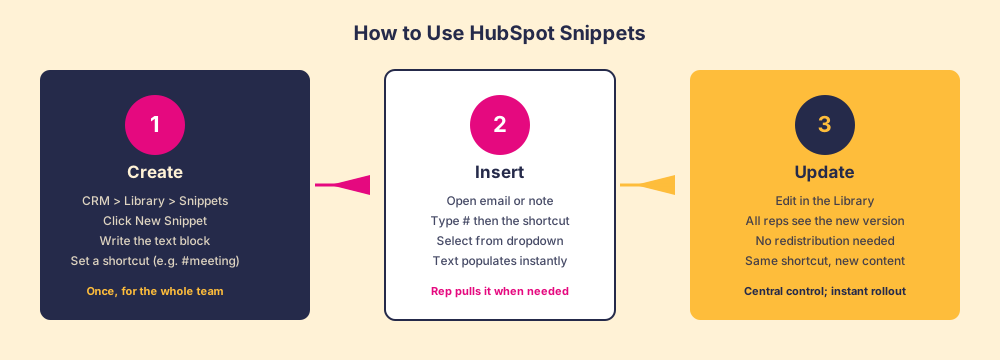
A snippet works like a saved keyboard shortcut that outputs a paragraph instead of a character. The shortcut triggers text insertion; the text itself lives in one place that a manager or enablement lead controls. Change it once, and every rep using that shortcut gets the new version automatically.
The practical range covers four kinds of text. You can use snippets in:
- Meeting link blocks. Instead of typing or pasting the Calendly or HubSpot Meetings link each time, a rep types #meeting and the full scheduling paragraph appears.
- Standard disclaimers. Compliance language, unsubscribe notes, or confidentiality footers that must appear verbatim.
- Follow-up sentence starters. “Following up on our conversation from” or “I wanted to circle back on the proposal” type phrases that appear dozens of times per week.
- Common objection responses. A concise, approved phrasing for the top two or three objections the team hears, so every rep says it the same way.
What they share is brevity and repetition: a snippet is useful for text that is short, used constantly, and benefits from standardization.
How to use HubSpot snippets, step by step
The setup is in HubSpot under CRM, then Library, then Snippets. Click New Snippet, write the text, give it a name and a shortcut, and save. HubSpot’s official snippet documentation walks through the exact field locations if you need a reference while you build your first one. The shortcut can be anything without spaces, but a consistent naming convention helps. Prefixes by category work well: #mtg for meeting links, #fu for follow-ups, #disc for disclaimers.
To insert a snippet, open any text field in HubSpot where you would normally type a message. In the email compose window, a note, a task, or a chat message, type # and then the beginning of the shortcut. A dropdown appears with matching snippets. Select the one you want and the text expands in the field. You edit it inline if needed before sending.
On the management side, the Library is the single source. Any admin can update a snippet’s content, and the change takes effect immediately for every user. There is no redistribution step.
A relevant detail for reps who work across tools: snippets are available in the HubSpot sales sidebar and in Gmail and Outlook via the HubSpot Chrome extension. The hash-shortcut trigger works in the same tools reps are already using, which removes a standard reason reps skip a feature: it does not require opening a new tab or navigating to a separate tool.
HubSpot snippets vs templates: what is the difference?
The question of hubspot snippets vs templates comes up constantly, and the confusion is understandable. Both live in the Library. Both are reusable. Both save time. The difference is in scope, structure, and what HubSpot can do with each one.
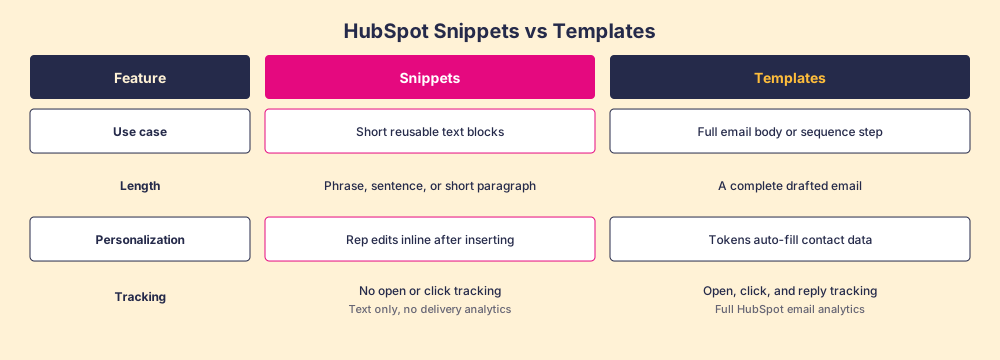
A snippet is a text fragment. It goes inside an email, a note, or a chat message that a rep is composing. It has no subject line, no personalization tokens, and no tracking. The rep takes the text and puts it wherever it belongs in whatever they are writing.
A template is a complete email: subject line, body, personalization tokens that auto-fill contact name and company, and full HubSpot tracking on opens, clicks, and replies. Templates are the right tool when you want an outbound email that can be sent with one or two tweaks and tracked in HubSpot.
The decision is straightforward:
- Snippets for boilerplate that travels inside messages. Meeting links, disclaimers, objection responses, recurring phrases. Text that augments something the rep is writing.
- Templates for complete outbound emails. Cold outreach, follow-up emails after demos, post-proposal sends. Messages that need tracking to close the loop on whether the buyer engaged.
Some teams use both together: the email is built from a template, and the rep inserts a snippet for the standard pricing disclaimer at the bottom. That combination is fine and common.
The honest turn: what snippets cannot do
Snippets are pull-based. The rep chooses when to use them. So the rep has to remember the shortcut exists, know which one fits the current situation, and decide to use it. When a rep is moving fast, behind on pipeline, or juggling six open deals, the snippet library they were trained on two months ago is not the first thing they reach for. It is the library they forget exists.
Pull-based tools behave this way under real selling conditions, snippets included. The rep pulls the snippet when they think to; the snippet does nothing if the rep does not pull it.
In our survey of sales leaders for The State of Sales Enablement, we found that 89 percent of teams had a defined process, yet only 36 percent saw it followed, and guidance delivered in the flow of work split quota attainment from 15 percent to 49 percent. A tool reps can reach and a tool that reaches reps at the moment they need it produce different numbers.
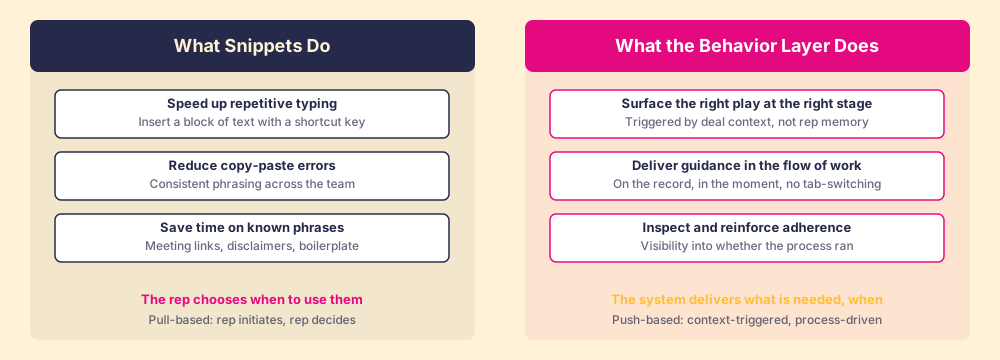
The right side of that diagram is the behavior layer’s job. Supered is the behavior layer that rides alongside HubSpot: it surfaces the next step of your process while the rep works the deal, delivers the playbook in the flow of work, captures the CRM update as a byproduct, and makes adherence visible deal by deal. Deal context triggers it, so rep memory does not have to. When a deal moves to a new stage, or when a contact property changes, or when a rep opens a record that meets specific conditions, Supered surfaces what the rep needs, where they are working, without asking the rep to remember anything. It inspects whether that guidance was acted on. It feeds that data back so managers can coach on adherence rather than guessing.
Knowledge is solved. Any rep can find any snippet, any playbook, any FAQ document, in seconds. What remains unsolved is whether the right play runs at the right moment, in the flow of the work, on this deal, with this rep.
It is a behavior problem.
Snippets solve a content delivery problem: getting a standardized phrase from a central library into a message a rep is composing. The sales process adherence problem and the behavior problem are upstream of that. They require a layer that knows the deal context, delivers guidance proactively, and measures the output.
When should you use snippets vs templates?
If the question is “how do I get my team to stop retyping the same meeting link in every email,” use snippets.
If the question is “how do I make sure reps send the right message at the right stage, and how do I know if they did,” you need a behavior layer.
And if the question is “how do I get adoption of my HubSpot portal across a team that keeps reverting to old habits,” you need more than either: CRM adoption strategy, process inspection, and guidance in the flow of work rather than training that lives in a document a rep read once.
The digital adoption platform category addresses some of this. So does sales enablement software when it is built around behavior and adherence rather than content storage. The distinctions matter because buying the wrong tool for the wrong job does not close the gap.
What to do with snippets right now
If your team does not have a snippet library, build one this week. The inventory is fast: pull the last thirty emails a rep sent, identify the six or eight phrases that appear repeatedly, write one canonical version of each, and give each a logical shortcut. Roll it out in the next team meeting. The adoption barrier is low enough that usage tends to stick without a dedicated training event.
Once the library exists, the maintenance task is keeping it current. Snippets go stale when pricing language changes, when a product name changes, or when the approved phrasing on a topic evolves. Assign someone to own the Library, schedule a quarterly review, and you have covered the tool well.
The bigger question, the one about whether the right play runs on the right deal at the right moment, is the one Supered is built to answer. That question is worth asking separately from whether your snippet library is in good shape, because the answers require different tools.
Both questions matter. They have different ceilings.
If you want to see what the behavior layer looks like in practice, book a demo and we will walk through how it works inside the CRM your team already uses.
Frequently asked questions
What are HubSpot snippets?+
How are HubSpot snippets different from HubSpot email templates?+
How do you use HubSpot snippets in practice?+
Do HubSpot snippets work in the Chrome extension or sidebar?+
Why do snippets not replace a sales enablement layer?+
Your process, running itself.