HubSpot Documents: How to Track Engagement and Act on the Signal
The HubSpot documents tool tells you who opened your content, which pages they read, and how long they spent. That is valuable signal. Here is what to do with it.
HubSpot documents is a content-sharing and tracking tool inside HubSpot CRM that lets reps upload files, generate tracked links, and see exactly who viewed each document, when, and for how long, with page-by-page engagement data logged automatically to the contact record.
There is a simple test you can run to see how well your sales team handles buyer signals. Send a prospect a proposal, watch for the notification that they opened it, then ask your rep what happened next. Most of the time the answer is: “I saw it, planned to follow up, then got pulled into something else.” The signal arrived. Nothing changed.
The HubSpot documents tool is one of the better implementations of content tracking in a CRM. It solves a real problem. But the signal it generates, who viewed what and for how long, is only as valuable as the process that sits on the other side of it.
What are HubSpot documents, exactly?
HubSpot documents is a content-sharing and tracking tool inside HubSpot CRM that lets reps upload files, generate tracked links, and see exactly who viewed each document, when, and for how long, with page-by-page engagement data logged automatically to the contact record. It is worth holding that definition clearly, because it shapes what you should expect from the tool and what you should build separately.
The hubspot documents tool lives inside the Sales Hub under the Documents tab. Reps upload a PDF, slide deck, or Word file, then share it via a tracked link rather than a standard attachment. Free accounts get five documents. Starter and above get unlimited. The link can be sent directly from HubSpot, from the Gmail or Outlook integration, or copied and pasted wherever the rep is working.
What the tool does not do: it does not gate the document behind a form (that is HubSpot’s marketing content tools), it does not replace proposals or e-signature, and it does not tell your rep what to say after the prospect opens it. Those are separate jobs.
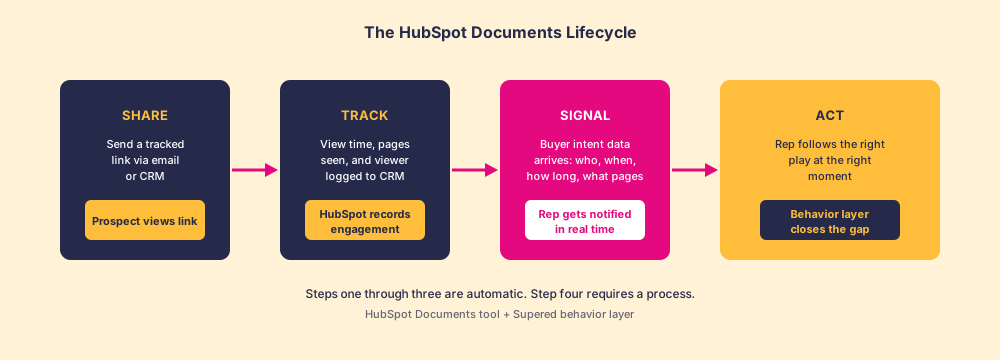
Picture a letter sealed inside a glass envelope. You can see it the moment the recipient opens it, which page they unfold first, how long they hold it, and whether they hand it to someone else in the room. That is essentially what the tool does, and the image is useful because it also shows the limit: seeing the moment of reading is not the same as knowing what to say when you call them.
What does HubSpot document tracking show you?
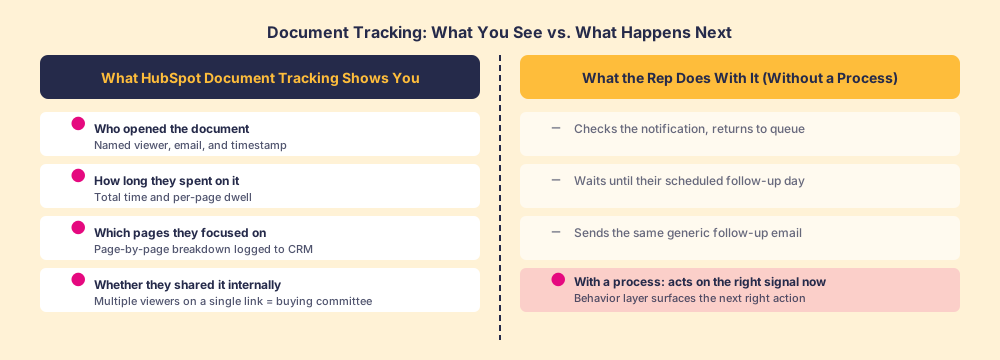
This is where the tool earns its keep. HubSpot document tracking captures engagement at a level that a forwarded attachment never can. For each view event, the CRM records:
- Who opened it. The viewer’s name and email are captured if they are a known contact or if they enter their details on the document access page (which you can require or skip, depending on the friction trade-off you want to make).
- When they opened it. Timestamp logged to the activity timeline, so you can see whether they viewed it during business hours or after a committee review session and sequence your follow-up accordingly.
- How long they spent. Total time on the document, plus time per page, so you can see whether they read every section or bailed after the cover.
- Which pages held their attention. Page-by-page dwell time is the most useful data point for a sales conversation, because it tells you which section mattered. A prospect who spent six minutes on the implementation slide and thirty seconds on pricing has a different set of questions than one who did the reverse.
- Whether they forwarded it internally. Multiple viewer events on a single link, from different email addresses, is a signal that the document is moving through a buying committee.
None of this data requires extra setup beyond the initial upload. It all flows to the contact record automatically.
Who is most likely to forward your document to the buying committee?
Worth a brief detour here, because the forwarding signal is underused. Research from Gartner on B2B buying groups shows the average purchase decision involves six to ten stakeholders (Gartner, “The New B2B Buying Journey”). A rep who sees three views from two unknown email addresses on a single link has evidence the deal is alive and spreading internally. That is not noise. It is a trigger for a different kind of outreach, one that shifts from selling to one person to preparing the full buying committee for the decision.
Most reps miss this signal entirely, not because the CRM fails to log it, but because nobody told them what to do with it.
Is the signal from HubSpot document tracking reliable?
Mostly, with a few honest caveats. The tool requires the viewer to accept cookie tracking in their browser, so privacy settings or corporate email clients can suppress a view event. A prospect using Apple Mail Privacy Protection or a browser with strict tracking prevention may generate a false open. HubSpot is transparent about this limitation in their documentation.
The practical implication: treat a positive signal (a view logged) as reliable; treat a missing signal as ambiguous rather than confirmation that the prospect did not open it. Sales teams that build rigid workflows around confirmed opens, treating anything without a view event as a dead deal, will misread a meaningful portion of their pipeline. The tool is a positive indicator, not an omniscient tracker.
What is the gap between seeing the signal and acting on it?
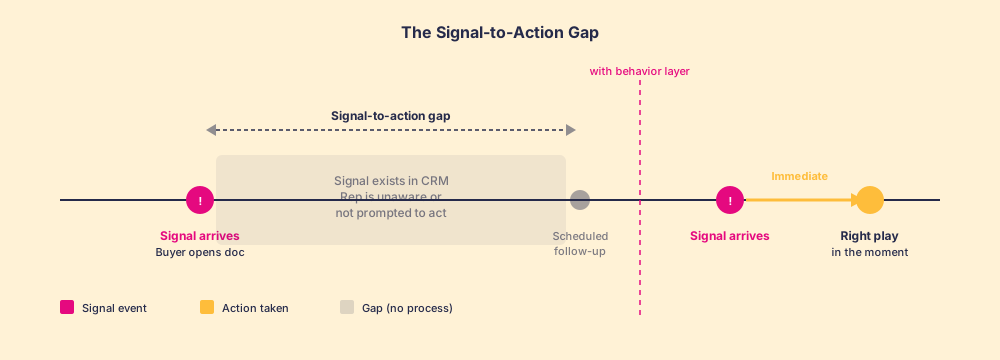
This is the harder question, and the one most conversations about HubSpot documents skip. The tracking works. The data arrives in the CRM. The rep gets a notification. And then, on most teams, very little happens in a useful way.
In our survey of 198 sales leaders for The State of Sales Enablement, 89 percent of teams had a defined sales process and 36 percent saw it followed, and guidance in the flow of work split quota attainment from 15 percent to 49 percent. The document-tracking signal is a microcosm of that gap. The trigger is there. The rep’s next step, what call to make, what to say, which stage to update, is governed entirely by whether a process exists for that moment.
A notification that a prospect opened your proposal is not self-interpreting. It tells you something happened. It does not tell your rep:
- Whether to call immediately or wait an hour
- What question to lead with given the page-by-page breakdown
- What the right next stage is if the prospect spent time on pricing but has not responded
- Whether to loop in the prospect’s manager given the multiple-viewer signal
That interpretation requires a process. And a process, to be reliable, needs to reach the rep in the moment the signal fires, not live in a playbook document the rep may or may not have memorized.
How do you connect the HubSpot documents tool to the Chrome extension?
If your reps spend most of their day in Gmail or Outlook, the HubSpot Chrome extension is where document sharing becomes frictionless. The extension surfaces the document library inline when composing an email, so the rep can insert a tracked link without opening a new tab or copying and pasting from the CRM.
The extension logs the send event directly to the contact record in HubSpot, which means the view notification and the original send are visible on the same activity timeline. For a rep working out of their inbox, this is the lowest-friction path to using the documents tool consistently.
Consistency matters more than most teams realize. A tool used on some deals but not others produces fragmented data. When HubSpot document tracking is used reliably across a segment, the engagement patterns start to surface insights at the team level: which assets get read thoroughly versus skimmed, which content correlates with deals that advance, which documents trigger multiple-viewer events (the buying committee signal) most often. That aggregate view is only visible if the tool is part of a shared process, not a habit some reps have adopted individually.
The behavior frame applies here too. Consistent CRM adoption is the foundation this data builds on, and the research on CRM adoption makes clear that tool usage follows from process definition and in-flow prompts, not from training sessions or manager reminders.
The honest rec: use HubSpot documents, and build the next step too
The HubSpot documents tool is genuinely useful and worth using from day one of your HubSpot setup. The document tracking capability in particular gives sales teams a level of buyer visibility they cannot get from email attachments, and it costs nothing beyond what you are already paying for HubSpot. Set it up, get your reps sharing tracked links consistently, and pay attention to the page-level data, especially the buying-committee signal of multiple viewers on one link.
The part to build alongside it is the process for what happens after the signal fires. That means:
- Defined triggers by engagement type. Prospect views and exits in under a minute? Different next step than prospect who spent eight minutes on pricing. Map the patterns to specific actions.
- Prescribed talk tracks for each trigger. Not a suggestion that the rep “follow up.” A specific opening question, a specific objective for the call, a specific next stage if the call goes well.
- Process in the flow of work. The right action needs to reach the rep when the notification fires, inside the tools they are already using. A playbook in a shared drive is not in the flow of work.
The sales process research is consistent here: knowing what to do is not the same as doing it, and the gap closes when the prescription arrives in the moment rather than sitting in a document the rep has to go find.
Supered is the behavior layer that carries that prescription to the rep in the moment, inside HubSpot, tied to the signals the CRM already generates. When the document-view notification fires, Supered surfaces the prescribed next step at the deal record, so engagement data becomes action instead of ambient noise that gets triaged and forgotten. One without the other is a notification system, not a sales motion. For the broader system it fits into, how it works walks through the full flow.
The sales enablement software landscape is full of tools that generate signal. The ones that close the gap between signal and behavior are rarer. HubSpot documents gives you the signal. Supered gives you the action. Teams that run both, with a tight process between them, close at rates the tracking tool alone cannot explain.
Book a demo to see how Supered connects the document-engagement signal to a process-defined next step inside HubSpot.
Frequently asked questions
What are HubSpot documents?+
How does HubSpot document tracking work?+
What is the difference between HubSpot documents and attachments?+
Does the HubSpot documents tool work with the HubSpot Chrome extension?+
Why is acting on document tracking data so difficult?+
What should a rep do when a prospect views a HubSpot document?+
Your process, running itself.